
 数据结构
数据结构 网络
网络 关系数据库管理系统
 操作系统
操作系统 Java
Java Microsoft Excel
 iOS
iOS HTML
HTML CSS
CSS Android
 Python
 C 编程
C 编程 C++
C++ C#
C# MongoDB
 MySQL
MySQL JavaScript
 PHP
PHP 物理
物理 化学
化学 生物
生物 数学
数学 英语
英语 经济学
经济学 心理学
心理学 社会研究
社会研究 时尚研究
时尚研究 法律研究
法律研究以 Java Swing 创建半透明窗口
使用 JDK 7,我们可以非常轻松地使用 Swing 创建一个半透明窗口。通过以下代码,可以使一个 JFrame 变为半透明。
// Set the window to 55% opaque (45% translucent).
frame.setOpacity(0.55f);
示例
请看下面这个半透明度为 55% 的窗口示例。
import java.awt.GridBagLayout;
import javax.swing.JButton;
import javax.swing.JFrame;
import javax.swing.SwingUtilities;

public class Tester {
   public static void main(String[] args)  {
      JFrame.setDefaultLookAndFeelDecorated(true);
         // Create the GUI on the event-dispatching thread
         SwingUtilities.invokeLater(new Runnable() {
         @Override
         public void run() {
            createWindow();
         }
      });
   }

   private static void createWindow() {
      JFrame frame = new JFrame("Translucent Window");
      frame.setDefaultCloseOperation(JFrame.EXIT_ON_CLOSE);

      frame.setLayout(new GridBagLayout());
      frame.setSize(200, 200);
      frame.setLocationRelativeTo(null);

      //Add a sample button.
      frame.add(new JButton("Hello World"));

      // Set the window to 55% opaque (45% translucent).
      frame.setOpacity(0.55f);
      frame.setVisible(true);
   }
}
输出
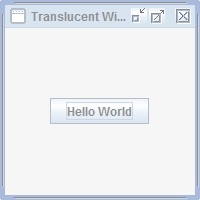

更新日期: 2020-6-19
300 阅读量

广告