
 数据结构
数据结构 网络
网络 关系型数据库管理系统 (RDBMS)
 操作系统
操作系统 Java
Java MS Excel
 iOS
iOS HTML
HTML CSS
CSS Android
 Python
 C语言编程
C语言编程 C++
C++ C#
C# MongoDB
 MySQL
MySQL Javascript
 PHP
PHP 物理学
物理学 化学
化学 生物学
生物学 数学
数学 英语
英语 经济学
经济学 心理学
心理学 社会学
社会学 服装学
服装学 法学
法学创建旋律程序
一个简单的蜂鸣器可以连接到 ESP32 控制器来发出声音。它也可以用来产生旋律。本文使用两个不同的例子,在 Arduino 上使用 C 代码让蜂鸣器播放旋律。在第一个例子“一闪一闪亮晶晶”中,播放诗歌的音符;在第二个例子中,使用另一首著名诗歌“铃儿响叮当”来播放音符,同时让两个彩色 LED 灯开关来创造一个灯光与音乐的表演。
示例 1:使用蜂鸣器和 ESP32 播放诗歌音符
电路是使用 Arduino 软件制作的,程序也是用它编写的。这里给出的 C 语言程序定义了不同钢琴键的音乐音符频率。playNotes() 函数用于根据音符的持续时间和播放时间使蜂鸣器引脚变高或变低。
电路设计步骤和编码
步骤 1 − 将 ESP32 微控制器连接到面包板。
步骤 2 − 将蜂鸣器也放在面包板上。
步骤 3 − 将蜂鸣器的正极连接到 ESP32 的 D26 引脚。将蜂鸣器的负极连接到 ESP32 的 GND 引脚。
步骤 4 − 使用 Arduino 为播放旋律编写 C 程序。
步骤 5 − 使用 USB 数据线将 ESP32 连接到电脑。
步骤 6 − 编译并将代码传输到 ESP32,然后检查结果。
代码
// set piano notes (frequencies)
#define c 3830
#define d 3400
#define e 3038
#define f 2864
#define g 2550
#define a 2272
#define b 2028
#define C 1912
#define R 0

// buzzer pin is D26 on ESP32

int buzzOut  = 26;
int startFlag = 1;
int flagPlay=1;
// this rhythm_measure is the tempo of the song
long rhythm_measure = 10000;

int pauseTime = 500;
int do_nothing = 2;

int audioTone = 0;
int beat1 = 0;
long timedur  = 0;

void setup() {
   // set the buzzer as output component for melody
   pinMode(buzzOut, OUTPUT);
   if (startFlag) {
      // specify the baud rate
      Serial.begin(9600);
   }
}

// these are the music notes for Twinkle twinkle little star poem
double songNotes[] = {
   c,c,g,g,a,a,g,
   f,f,e,e,d,d,c,
   g,g,f,f,e,e,d,
   g,g,f,f,e,e,d,
   c,c,g,g,a,a,g,
   f,f,e,e,d,d,c
};

int MAX_COUNT = sizeof(songNotes) / 2;

// this is the function which makes the buzzer high and low while playing the poem notes
void playNotes() {
   long passed_time = 0;
   if (audioTone > 0) {

      while (passed_time < timedur) {
      digitalWrite(buzzOut,HIGH);
      delayMicroseconds(audioTone / 2);
      digitalWrite(buzzOut, LOW);
      delayMicroseconds(audioTone / 2);
      passed_time += (audioTone);
      }
   }
   else {
      for (int n = 0; n < do_nothing; n++) {
         delayMicroseconds(timedur);
      }
   }

}
void loop() {
   for (int m=0; m<MAX_COUNT; m++) {
      audioTone = songNotes[m];
       beat1 = 50;


       timedur = beat1 * rhythm_measure;
       if( flagPlay != 0)        {
         playNotes();
      }

      delayMicroseconds(pauseTime);
   }
   delay(5000);
}
查看结果
代码编译并传输/上传到 ESP32 后,即可看到结果。
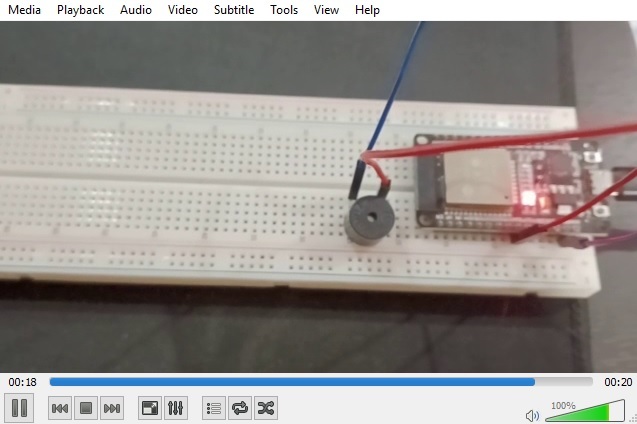
示例 2:使用 LED、蜂鸣器和 ESP32 播放诗歌音符并制作跳舞的灯光
给出了 C 语言程序。playNotes() 函数用于根据音符的持续时间和播放时间使蜂鸣器引脚变高或变低。loop() 函数中的代码还使红色和绿色 LED 灯随着音乐播放而变高和变低。
电路设计步骤和编码
步骤 1 − 将 ESP32 放置在面包板上。将 GND 连接到负轨。
步骤 2 − 连接蜂鸣器。将其正极连接到 ESP32 的 D26 引脚,将其负极连接到面包板的负轨。
步骤 3 − 将红色 LED 连接到面包板上。将其较小的引脚连接到负轨,较大的引脚(正极)通过电阻连接到 ESP32 的 D12 引脚。
步骤 4 − 将绿色 LED 连接到面包板上。将其较小的引脚连接到负轨,较大的引脚(正极)通过电阻连接到 ESP32 的 D13 引脚。
步骤 5 − 使用 Arduino 编写 C 程序来播放旋律并使两个 LED 灯交替开关。
步骤 6 − 使用 USB 数据线将 ESP32 连接到电脑。
步骤 7 − 编译并将代码传输到 ESP32,然后检查结果。
代码
// set piano notes (frequencies)
#define R 0
#define cnote 3830
#define d 3400
#define e 3038
#define f 2864
#define g 2550
#define b 2028
#define C 1912

// buzzer pin is D26 on ESP32
int buzzOut = 26;

// Green color LED pin is D13 on ESP32
int LED_green = 13;

// Red color LED pin is D12 on ESP32
int LED_red = 12;
int LED_flag = 0;
int flag1 = 0;

// this rhythm_measure is the tempo of the song
long rhythm_measure = 15000;
int pauseDur = 2000;
int doNothing = 200;
int audioTone = 0;
int beat1 = 0;
long timedur = 0;

//These are the music notes for the Jingle bells poem
int songNotes[] = { e, e, e,
   e, e, e,
   e, g, cnote, d, e,
   f, f, f,
   f, f, e, e,
   e, e, e,
   d, d, e, d, g, R
};
int MaxNo = sizeof(songNotes) / 2;
int songBeats[] = { 16, 16, 32,
   16, 16, 32,
   16, 16, 16, 8, 48,
   16, 16, 16,
   16, 16, 8, 8,
   16, 16, 16,
   16, 16, 16, 16, 8, 48
};
void changeFlag() {
   if (LED_flag == 0){
      LED_flag = 1;
   } else {
      LED_flag = 0;
   }
}
void playNote() {
   long passed_time = 0;
   if (audioTone > 0) {
      while (passed_time < timedur) {
         digitalWrite(buzzOut,HIGH);
         delayMicroseconds(audioTone / 2);
         digitalWrite(buzzOut, LOW);
         delayMicroseconds(audioTone / 2);
         passed_time += (audioTone);
      }
   }
   else {
      for (int m = 0; m < doNothing; m++) {
         delayMicroseconds(timedur);
      }
   }
}
void setup() {

   // set the buzzer as output component for melody
   pinMode(buzzOut, OUTPUT);

   // set the LEDs as output component for dancing lights
   pinMode(LED_green, OUTPUT);
   pinMode(LED_red, OUTPUT);
   if (flag1) {
      Serial.begin(9600); // Set serial out if we want flag1ging
   }
}
void loop() {
   for (int n=0; n<MaxNo; n++) {
      audioTone = songNotes[n];
      beat1 = songBeats[n];
      changeFlag();
      if (LED_flag == 1){

         // make the green and red lights on and off one after the other
         digitalWrite(LED_green,HIGH);
         digitalWrite(LED_red,LOW);
      } else {
         digitalWrite(LED_green,LOW);
         digitalWrite(LED_red,HIGH);
      }
      timedur = beat1 * rhythm_measure;
      playNote();
      delayMicroseconds(1000);
      if (LED_flag == 1){
         digitalWrite(LED_green,LOW);
         digitalWrite(LED_red,LOW);
      } else {
         digitalWrite(LED_green,LOW);
         digitalWrite(LED_red,LOW);
      }
      if (flag1) {
         Serial.print(n);
         Serial.print(":");
         Serial.print(beat1);
         Serial.print(" ");
         Serial.print(audioTone);
         Serial.print(" ");
         Serial.println(timedur);
      }
   }
}
查看结果 - 示例 2
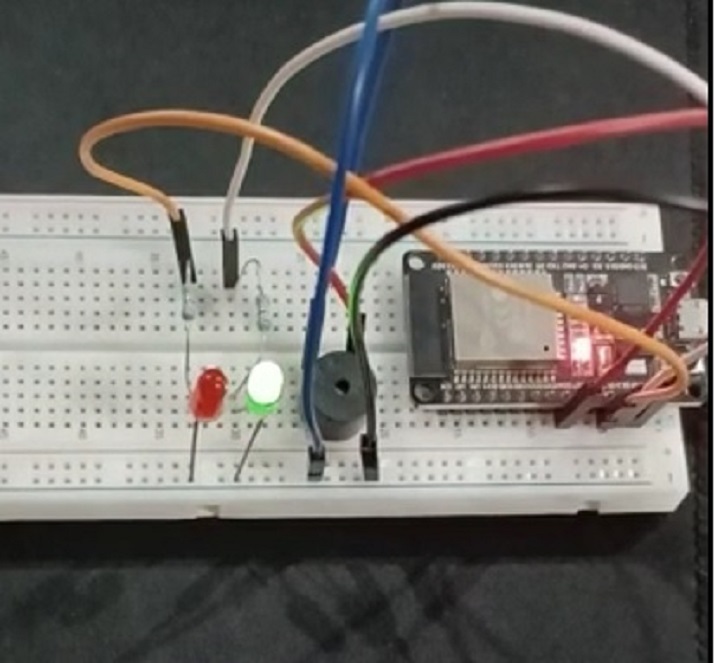
图:显示播放旋律并使 LED 灯开关的电路。
本文使用两个不同的例子,介绍了使用 ESP32 和蜂鸣器播放旋律的方法。首先介绍了播放诗歌旋律的方法,在第二个例子中,播放另一个旋律的同时,LED 灯交替开关,制作灯光秀。

浏览量:379
