
 数据结构
数据结构 网络
网络 关系数据库管理系统 (RDBMS)
 操作系统
操作系统 Java
Java MS Excel
 iOS
iOS HTML
HTML CSS
CSS Android
 Python
 C语言编程
C语言编程 C++
C++ C#
C# MongoDB
 MySQL
MySQL Javascript
 PHP
PHP 物理学
物理学 化学
化学 生物学
生物学 数学
数学 英语
英语 经济学
经济学 心理学
心理学 社会研究
社会研究 服装研究
服装研究 法律研究
法律研究Swift中动态改变TableView单元格高度
要在iOS中动态更改tableView单元格的高度,即根据可用内容调整单元格大小,我们需要使用自动尺寸属性。我们将通过一个示例项目来说明这一点。
创建一个空项目,并转到其viewController类,使其符合UITableViewDataSource和UITableViewDelegate。
现在,在下面的代码中,我们将首先创建一个表格,然后为该表格注册一个单元格,并添加一些表格属性。
我们将设置表格视图委托和表格视图数据源。
最后,我们将表格视图添加到视图中。然后,我们将在视图控制器的viewDidLoad方法中调用此函数。
注意:我们设置了一个名为estimatedRowHeight的属性
func initTableView() {
   let tableView = UITableView()
   tableView.frame = self.view.frame
   tableView.dataSource = self
   tableView.delegate = self
   tableView.backgroundColor = colorLiteral(red: 0.6000000238, green: 0.6000000238, blue: 0.6000000238, alpha: 1)
   tableView.register(UITableViewCell.self, forCellReuseIdentifier: "cell")
   tableView.estimatedRowHeight = UITableView.automaticDimension
   self.view.addSubview(tableView)
}
现在,这段代码将一个表格添加到我们的视图中,我们还需要告诉表格我们想要多少节和多少行。
func numberOfSections(in tableView: UITableView) -> Int {
   return 1
}
func tableView(_ tableView: UITableView, numberOfRowsInSection section: Int) -> Int {
   return 5
}
func numberOfSections(in tableView: UITableView) -> Int {
   return 1
}
func tableView(_ tableView: UITableView, numberOfRowsInSection section: Int) -> Int {
   return 5
}
这段代码将在我们的表格视图的第二行创建一些较长的文本,以便它根据内容大小获取高度。
注意:UITableViewCell默认情况下有一个label属性,并且label默认只有一行长度,因此我们需要更改它才能看到自动尺寸的效果。
现在我们需要告诉表格它的单元格应该有多高。
func tableView(_ tableView: UITableView, heightForRowAt indexPath: IndexPath) -> CGFloat {
   return UITableView.automaticDimension
}
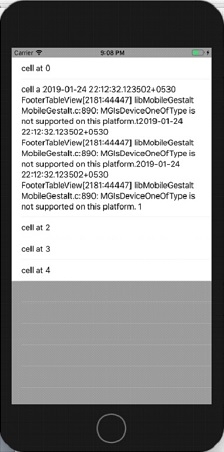
运行上面的代码,我们将得到以下结果。

更新于:2019年7月30日
7K+ 次浏览

广告