
 数据结构
数据结构 网络
网络 关系数据库管理系统 (RDBMS)
 操作系统
操作系统 Java
Java MS Excel
 iOS
iOS HTML
HTML CSS
CSS Android
 Python
 C语言编程
C语言编程 C++
C++ C#
C# MongoDB
 MySQL
MySQL Javascript
 PHP
PHP 物理学
物理学 化学
化学 生物学
生物学 数学
数学 英语
英语 经济学
经济学 心理学
心理学 社会学
社会学 服装学
服装学 法学
法学如何在Python中使用TensorFlow验证Fashion MNIST的预测结果?
TensorFlow是Google提供的机器学习框架。它是一个开源框架,与Python结合使用,可以实现算法、深度学习应用程序等等。它用于研究和生产目的。
可以使用以下代码行在Windows上安装“tensorflow”包:
pip install tensorflow
“Fashion MNIST”数据集包含各种服装的图像。它包含超过7万张属于10个不同类别的服装的灰度图像。这些图像是低分辨率的(28 x 28像素)。
我们使用Google Colaboratory来运行以下代码。Google Colab或Colaboratory帮助在浏览器上运行Python代码,无需任何配置,并可免费访问GPU(图形处理单元)。Colaboratory构建在Jupyter Notebook之上。
以下是验证Python中Fashion MNIST预测结果的代码片段:
示例
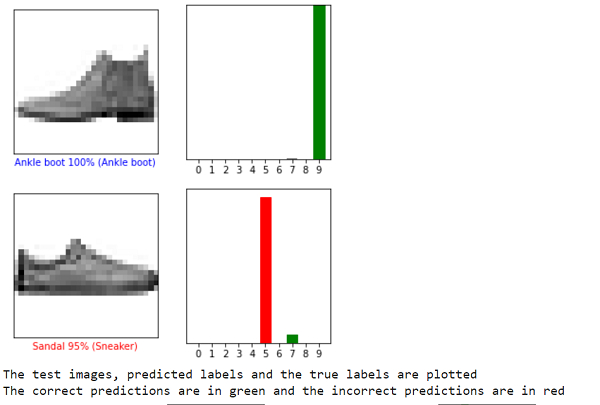
i = 0
plt.figure(figsize=(6,3))
plt.subplot(1,2,1)
plot_image(i, predictions[i], test_labels, test_images)
plt.subplot(1,2,2)
plot_value_array(i, predictions[i],  test_labels)
plt.show()

i = 12
plt.figure(figsize=(6,3))
plt.subplot(1,2,1)
plot_image(i, predictions[i], test_labels, test_images)
plt.subplot(1,2,2)
plot_value_array(i, predictions[i],  test_labels)
plt.show()

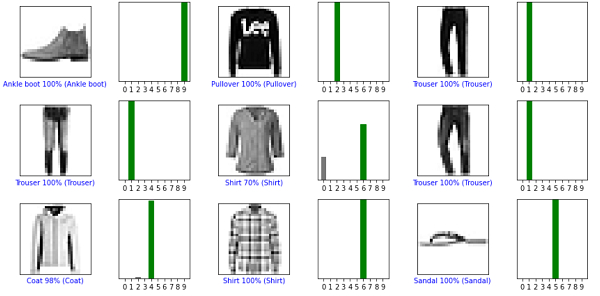
num_rows = 5
num_cols = 3
print("The test images, predicted labels and the true labels are plotted")
print("The correct predictions are in green and the incorrect predictions are in red")
num_images = num_rows*num_cols
plt.figure(figsize=(2*2*num_cols, 2*num_rows))
for i in range(num_images):
  plt.subplot(num_rows, 2*num_cols, 2*i+1)
  plot_image(i, predictions[i], test_labels, test_images)
  plt.subplot(num_rows, 2*num_cols, 2*i+2)
  plot_value_array(i, predictions[i], test_labels)
plt.tight_layout()
plt.show()
代码来源 − https://tensorflowcn.cn/tutorials/keras/classification
输出

解释
模型训练完成后,可用于对其他图像进行预测。
对图像进行预测,并显示预测数组。
正确预测的标签为绿色,错误预测的标签为红色。
数字表示预测标签的百分比值。
它说明模型预测的标签与图像的实际标签的准确程度。

更新于:2021年1月20日
116 次浏览

广告