
 数据结构
数据结构 网络
网络 RDBMS
RDBMS 操作系统
操作系统 Java
Java MS Excel
 iOS
iOS HTML
HTML CSS
CSS Android
 Python
 C 编程
C 编程 C++
C++ C#
C# MongoDB
 MySQL
MySQL Javascript
 PHP
PHP 物理学
物理学 化学
化学 生物学
生物学 数学
数学 英语
英语 经济学
经济学 心理学
心理学 社会学
社会学 时尚学
时尚学 法律学
法律学如何让 Selenium 脚本在自动化中保持会话有效?
我们可以在自动化中让 Selenium 脚本的会话保持有效。在 Chrome 浏览器中,可以通过 ChromeOptions 和 Capabilities 类来实现这一目标。
Capabilities 类可以通过 getCapabilities 方法获取浏览器的功能。这种技术通常用于在一个包含大量步骤的场景中调试某个特定步骤。
首先,让我们尝试在以下页面的突出显示编辑框中输入文本 −

代码实现
import org.openqa.selenium.WebDriver;
import org.openqa.selenium.WebElement;
import org.openqa.selenium.chrome.ChromeDriver;
import org.openqa.selenium.Capabilities;
import org.openqa.selenium.By;
import java.util.Map;
import java.util.concurrent.TimeUnit;
public class BrwSessionAlive{
   public static void main(String[] args)
   throws InterruptedException{
      System.setProperty("webdriver.chrome.driver",
      "C:\Users\ghs6kor\Desktop\Java\chromedriver.exe");
      WebDriver driver = new ChromeDriver();
      //obtain browser capabilities
      Capabilities cap = driver.getCapabilities();
      Map<String, Object> mp = cap.asMap();
      mp.forEach((key, value) -> {
         System.out.println("Key is: " + key + " Value is: " + value);
      });
      //implicit wait
      driver.manage().timeouts().implicitlyWait(10, TimeUnit.SECONDS);
      //url launch
      driver.
      get("https://tutorialspoint.com/about/about_careers.htm");
      //identify element
      WebElement e = driver.findElement(By.id("gsc-i-id1"));
      e.sendKeys("Selenium");
   }
}
输出
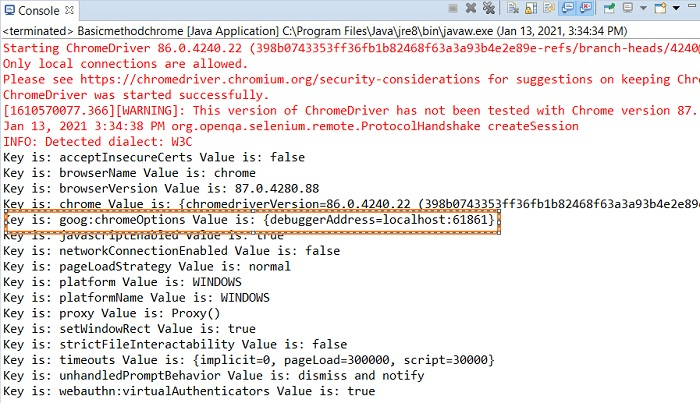
在上图中,我们突出显示了带有 localhost:61861 值的 debuggerAddress 参数。我们应当将此键值对添加到 ChromeOptions 类的实例中。
浏览器
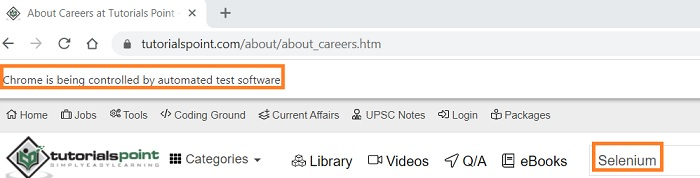
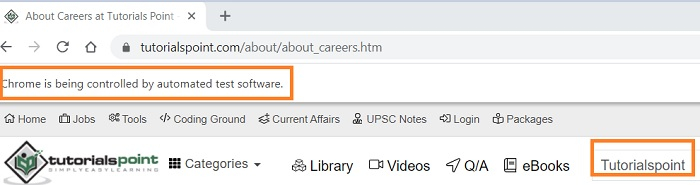
现在,我们将连接到这个现有的浏览器会话,并在此会话上执行其他自动化步骤。
修改代码以连接到旧会话。
import org.openqa.selenium.WebElement;
import org.openqa.selenium.chrome.ChromeDriver;
import org.openqa.selenium.chrome.ChromeOptions;
import org.openqa.selenium.Capabilities;
import org.openqa.selenium.By;
import java.util.Map;
import org.openqa.selenium.WebDriver;
import java.util.concurrent.TimeUnit;
public class BrwSessionAlive{
   public static void main(String[] args)
   throws InterruptedException{
      System.setProperty("webdriver.chrome.driver",
      "C:\Users\ghs6kor\Desktop\Java\chromedriver.exe");
      WebDriver driver = new ChromeDriver();
      //instance of ChromeOptions
      ChromeOptions op = new ChromeOptions();
      //configure debuggerAddress value
      op.setExperimentalOption("debuggerAddress", "localhost:61861");
      //obtain browser capabilities
      Capabilities cap = driver.getCapabilities(op);
      Map<String, Object> mp = cap.asMap();
      mp.forEach((key, value) -> {
         System.out.println("Key is: " + key + " Value is: " + value);
      });
      //implicit wait
      driver.manage().timeouts().implicitlyWait(10, TimeUnit.SECONDS);
      //identify element
      WebElement e = driver.findElement(By.id("gsc-i-id1"));
      //clear existing data
      e.clear();
      e.sendKeys("Tutorialspoint");
      String str = e.getAttribute("value");
      System.out.println("Attribute value: " + str);
   }
}
输出

浏览器

更新于: 2021-06-25
4K+ 查看次数

广告