
 数据结构
数据结构 网络
网络 RDBMS
RDBMS 操作系统
操作系统 Java
Java MS Excel
 iOS
iOS HTML
HTML CSS
CSS Android
 Python
 C 编程
C 编程 C++
C++ C#
C# MongoDB
 MySQL
MySQL Javascript
 PHP
PHP 物理
物理 化学
化学 生物
生物 数学
数学 英语
英语 经济
经济 心理学
心理学 社会研究
社会研究 时尚研究
时尚研究 法律研究
法律研究如何在 Java 中更改表格的表头背景颜色
要更改表头背景颜色,首先获取表头背景 -
JTableHeader tableHeader = table.getTableHeader();
现在,使用 set Background() 设置背景颜色 -
tableHeader.setBackground(Color.black);
上面我们使用了 Color 类来设置颜色。
下面是一个用于更改 JTable 的表头背景颜色的示例 -
示例
package my;
import java.awt.Color;
import java.awt.Font;
import javax.swing.JFrame;
import javax.swing.JScrollPane;
import javax.swing.JTable;
import javax.swing.table.JTableHeader;
public class SwingDemo {
   public static void main(String[] argv) throws Exception {
      Integer[][] marks = {
         { 70, 66, 76, 89, 67, 98 },
         { 67, 89, 64, 78, 59, 78 },
         { 68, 87, 71, 65, 87, 86 },
         { 80, 56, 89, 98, 59, 56 },
         { 75, 95, 90, 73, 57, 79 },
         { 69, 49, 56, 78, 76, 77 }
      };
      String col[] = { "S1", "S2", "S3", "S4", "S5", "S6"};
      JTable table = new JTable(marks, col);
      Font font = new Font("Verdana", Font.PLAIN, 12);
      table.setFont(font);
      table.setRowHeight(30);
      table.setBackground(Color.blue);
      table.setForeground(Color.white);
      JTableHeader tableHeader = table.getTableHeader();
      tableHeader.setBackground(Color.black);
      tableHeader.setForeground(Color.white);
      JFrame frame = new JFrame();
      frame.setSize(600, 400);
      frame.add(new JScrollPane(table));
      frame.setVisible(true);
   }
}
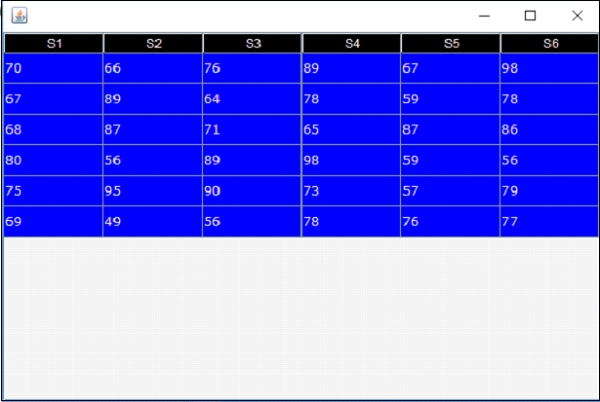
输出如下。此处,我们已将表头背景颜色更改为黑色 -
输出

更新于:2019-07-30
1 千+ 浏览次数

广告