
 数据结构
数据结构 网络
网络 RDBMS
RDBMS 操作系统
操作系统 Java
Java MS Excel
 iOS
iOS HTML
HTML CSS
CSS Android
 Python
 C 语言编程
 C++
C++ C#
C# MongoDB
 MySQL
MySQL Javascript
 PHP
PHP 物理
物理 化学
化学 生物
生物 数学
数学 英语
英语 经济学
经济学 心理学
心理学 社会研究
社会研究 时尚研究
时尚研究 法律研究
法律研究如何使用 Selenium 从网页中提取文本并将其另存为文本文件?
我们可以使用 Selenium webdriver 从网页中提取文本,并使用 getText 方法将其另存为文本文件。它可以提取显示的元素(而不是被 CSS 隐藏的元素)的文本。
我们必须使用任何一种定位器在页面上找到元素,例如 id、class、name、xpath、css、tag name、link text 或 partial link text。获取文本后,我们将使用 File 类将其内容写入文件。
让我们获取以下页面中的文本 - 您正在浏览 Online Education 的最佳资源 -

示例
import org.openqa.selenium.By;
import org.openqa.selenium.WebDriver;
import org.openqa.selenium.WebElement;
import org.openqa.selenium.firefox.FirefoxDriver;
import java.util.concurrent.TimeUnit;
import java.io.File;
import java.io.IOException;
import org.apache.commons.io.FileUtils;
import java.nio.charset.Charset;
public class GetTxtSaveFile{
   public static void main(String[] args) {
      System.setProperty("webdriver.gecko.driver",
         "C:\Users\ghs6kor\Desktop\Java\geckodriver.exe");
      WebDriver driver = new FirefoxDriver();
      //implicit wait
      driver.manage().timeouts().implicitlyWait(5, TimeUnit.SECONDS);
      //URL launch
      driver.get("https://tutorialspoint.com/index.htm");
      // identify element
      WebElement e = driver.findElement(By.tagName("h4"));
      //obtain text
      String s = e.getText();
      //write text to file

      File f = new File("savetxt.txt");
      try{
         FileUtils.writeStringToFile(f, s, Charset.defaultCharset());
      }catch(IOException exc){
         exc.printStackTrace();
      }
      driver.quit();
   }
}
输出
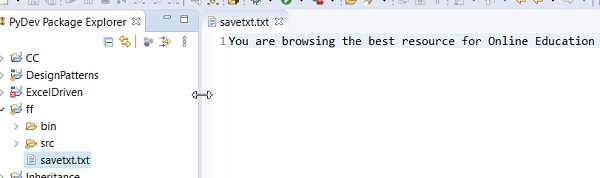
savetxt.txt 文件会在项目中生成,其中捕获自该页面的文本。

更新于: 06-04-2021
4K+ 浏览次数

广告