
 数据结构
数据结构 网络
网络 RDBMS
RDBMS 操作系统
操作系统 Java
Java MS Excel
 iOS
iOS HTML
HTML CSS
CSS Android
 Python
 C 编程
C 编程 C++
C++ C#
C# MongoDB
 MySQL
MySQL Javascript
 PHP
PHP 物理学
物理学 化学
化学 生物学
生物学 数学
数学 英语
英语 经济学
经济学 心理学
心理学 社会科学
社会科学 时尚研究
时尚研究 法律研究
法律研究如何在 Selenium 中从 href 链接中获取属性值?
我们可以在 Selenium 中从 href 链接中获取属性值。首先,我们必须先使用 css、id、class 等定位器来识别具有锚标记的元素。
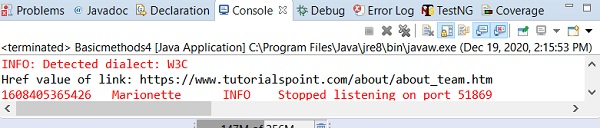
接下来,我们将使用getAttribute 方法,并将href 作为参数传递给该方法。让我们研究一个具有 href 属性的锚标记元素。此处,href 的值应包含/about/about_team.htm。

示例
代码实现。
import org.openqa.selenium.By;
import org.openqa.selenium.WebDriver;
import org.openqa.selenium.WebElement;
import org.openqa.selenium.chrome.ChromeDriver;
import java.util.concurrent.TimeUnit;
public class HrefValue{
   public static void main(String[] args) {
      System.setProperty("webdriver.chrome.driver", "C:\Users\ghs6kor\Desktop\Java\chromedriver.exe");
      WebDriver driver = new ChromeDriver();
      driver.manage().timeouts().implicitlyWait(5, TimeUnit.SECONDS);
      driver.get("https://tutorialspoint.com/about/about_team.htm");
      // identify element
      WebElement l = driver.findElement(By.linkText("Team"));
      // href value from getAttribute()
      String v = l.getAttribute("href");
      System.out.println("Href value of link: "+ v);
      driver.close();
   }
}
输出

更新于:2020 年 12 月 28 日
12K+ 次观看

广告