
 数据结构
数据结构 网络
网络 RDBMS
RDBMS 操作系统
操作系统 Java
Java MS Excel
 iOS
iOS HTML
HTML CSS
CSS Android
 Python
 C 编程
C 编程 C++
C++ C#
C# MongoDB
 MySQL
MySQL Javascript
 PHP
PHP 物理
物理 化学
化学 生物
生物 数学
数学 英语
英语 经济学
经济学 心理学
心理学 社会学
社会学 时尚学
时尚学 法学
法学HTML DOM ColumnGroup 对象
HTML DOM ColumnGroup 对象与 HTML <colgroup> 元素关联。<colgroup> 元素用于将 CSS 样式应用于特定数量的列或所有列。这使我们能够更好地控制表格中存在的列。
属性
以下是 ColumnGroup 属性 -
| 属性 | 描述 |
|---|---|
| span | 设置或返回列组的 span 属性值 |
语法
以下为语法 -
创建一个 ColumnGroup 对象 -
var x = document.createElement("COLGROUP");示例
让我们来看一个 ColumnGroup 对象的示例 -
<!DOCTYPE html>
<html>
<head>
<style>
   table, th, td {
      border: 1px solid black;
   }
   #DIV1{
      background-color:pink;
   }
</style>
</head>
<body>
<table id="TABLE1">
<tr>
<th>FRUIT</th>
<th>COLOR</th>
<th>Price</th>
</tr>
<tr>
<td>MANGO</td>
<td>YELLOW</td>
<td>100RS</td>
</tr>
<tr>
<td>GUAVA</td>
<td>GREEN</td>
<td>50RS</td>
</tr>
</table>
<p>Click the below button to create a colgroup element with span = 2.</p>
<button onclick="colFun()">COLGROUP</button>
<script>
   function colFun() {
      var x = document.createElement("COLGROUP");
      x.setAttribute("id","DIV1");
      x.setAttribute("span","2");
      document.getElementById("TABLE1").appendChild(x);
   }
</script>
</body>
</html>
输出
将产生以下输出 -
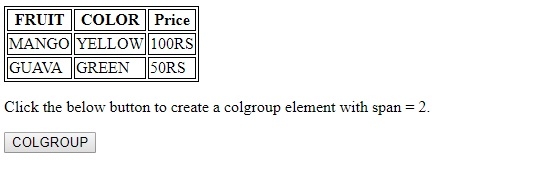
单击 COLGROUP 时 -
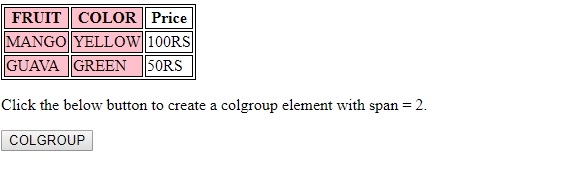
在以上示例中 -
我们首先创建了一个包含三行三列,id 为 "TABLE 1" 的表格。我们还将一些样式应用于表格及其子元素 -
table, th, td {
   border: 1px solid black;
}
<table id="TABLE1">
<tr>
<th>>FRUIT</th>
<th>COLOR</th>
<th>Price</th>
</tr>
<tr>
<td>MANGO</td>
<td>YELLOW</td>
<td>100RS</td>
</tr>
<tr>
<td>GUAVA</td>
<td>GREEN</td>
<td>50RS</td>
</tr>
</table>
我们然后创建一个按钮 COLGROUP,用户单击后将执行 colFun() -
<button onclick="colFun()">COLGROUP</button>
colFun() 方法创建了一个 <colgroup> 元素并将其赋给变量 x。使用 setAttribute() 方法,我们为新创建的 <colgroup> 元素分配了一个 id 和等于 2 的 span。然后,使用 <table> 元素上的 appendChild() 方法将 <colgroup> 元素附加为表格的第一个子元素 -
function colFun() {
   var x = document.createElement("COLGROUP");
   x.setAttribute("id","DIV1");
   x.setAttribute("span","2");
   document.getElementById("TABLE1").appendChild(x);
}

更新于: 20-Feb-2021
82 次浏览

广告