
 数据结构
数据结构 网络
网络 关系数据库管理系统 (RDBMS)
 操作系统
操作系统 Java
Java MS Excel
 iOS
iOS HTML
HTML CSS
CSS Android
 Python
 C语言编程
C语言编程 C++
C++ C#
C# MongoDB
 MySQL
MySQL Javascript
 PHP
PHP 物理
物理 化学
化学 生物
生物 数学
数学 英语
英语 经济学
经济学 心理学
心理学 社会学
社会学 服装设计
服装设计 法学
法学你可能没有用到的 HTML5 输入类型
HTML5 输入类型增强了用户体验,并最大限度地减少了对 JavaScript 验证的需求。下面列出了一些很少使用但可以显著改进网站表单的 HTML5 输入类型。
HTML5 输入类型值
| 输入类型 | 用途 |
| <input type="tel"> | 在移动浏览器上显示数字键盘,从而增强设备上的用户体验。 |
| <input type="date"> | 可以从日历中选择任何特定日期,确保格式正确。 |
| <input type="month"> | 它最大限度地减少了输入与月份/年份相关数据的复杂性。例如,设置信用卡的到期日期。 |
| <input type="file"> | 它可以直接将文件的选取整合到表单中,并且可以指定可接受的文件类型。 |
| <input type="hidden"> | 它可以用来传递机密数据、元数据等。 |
| <input type="datetime-local"> | 它允许更精确的输入,包括日期和时间。 |
| <input type="week"> | 它可以用来安排和安排会议,以及跟踪每周数据。 |
| <input type="email"> | 它在现代浏览器上提供基本的验证,例如检查“@”符号。 |
| <input type="range"> | 它提供了一种简单直观的方式来在一个指定范围内输入数字。 |
| <input type="url"> | 包含验证以确保正确的 URL 结构,对链接很有用。 |
| <input type="password"> | 适用于密码输入,并确保输入得到安全处理。 |
| <input type="time"> | 它提供时间选择和验证,并防止无效的时间格式。 |
| <input type="color"> | 它以可视化的方式简化了颜色值的输入。 |
| <input type="search"> | 它包含针对搜索进行了升级的特定样式和行为(例如“清除按钮”)。 |
| <input type="number"> | 它会自动验证输入是否为数字,并带有最小值和最大值属性。 |
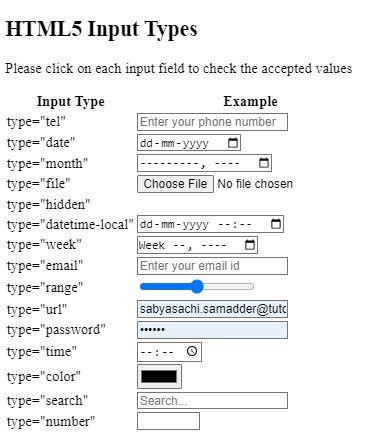
输入类型值的示例
在这个例子中,我们将向您展示每种类型值的用法,您可以点击任何输入字段自行查看输出结果。
示例
<!DOCTYPE html>
<html>

<head>
    <title>HTML5 Input Types</title>
</head>

<body>
    <h2>HTML5 Input Types</h2>
    <p>Please click on each input field to check the accepted values</p>
    <table>
        <tr>
            <th>Input Type</th>
            <th>Example</th>
        </tr>
        <tr>
            <td>type="tel"</td>
            <td><input type="tel"
                       name="phone"
                       placeholder="Enter your phone number"></td>
        </tr>
        <tr>
            <td>type="date"</td>
            <td><input type="date"
                       name="birthday"></td>
        </tr>
        <tr>
            <td>type="month"</td>
            <td><input type="month"
                       name="expiration_date"></td>
        </tr>
        <tr>
            <td>type="file"</td>
            <td><input type="file"
                       name="curriculum vitae" accept=".pdf, .doc"></td>
        </tr>
        <tr>
            <td>type="hidden"</td>
            <td><input type="hidden"
                       name="customer_id" value="1234"></td>
        </tr>
        <tr>
            <td>type="datetime-local"</td>
            <td><input type="datetime-local" id="interview"
                       name="interview"></td>
        </tr>
        <tr>
            <td>type="week"</td>
            <td><input type="week"
                       name="schedule_week"></td>
        </tr>
        <tr>
            <td>type="email"</td>
            <td><input type="email"
                       name="email"
                       placeholder="Enter your email id"></td>
        </tr>
        <tr>
            <td>type="range"</td>
            <td><input type="range"
                       name="volume" min="1" max="100"></td>
        </tr>
        <tr>
            <td>type="url"</td>
            <td><input type="url"
                       name="website"
                       placeholder="Enter your website url"></td>
        </tr>
        <tr>
            <td>type="password"</td>
            <td><input type="password"
                       name="password"
                       placeholder="Enter your password"></td>
        </tr>
        <tr>
            <td>type="time"</td>
            <td><input type="time"
                       name="interview_time"></td>
        </tr>
        <tr>
            <td>type="color"</td>
            <td><input type="color"
                       name="favcolor"></td>
        </tr>
        <tr>
            <td>type="search"</td>
            <td><input type="search"
                       name="search"
                       placeholder="Search..."></td>
        </tr>
        <tr>
            <td>type="number"</td>
            <td><input type="number"
                       name="quantity" min="1" max="100"></td>
        </tr>
</body>

</html>
输出

更新于:2024年9月26日
74 次浏览

广告