
 数据结构
数据结构 网络
网络 关系数据库管理系统 (RDBMS)
 操作系统
操作系统 Java
Java MS Excel
 iOS
iOS HTML
HTML CSS
CSS Android
 Python
 C 编程
C 编程 C++
C++ C#
C# MongoDB
 MySQL
MySQL Javascript
 PHP
PHP 物理学
物理学 化学
化学 生物学
生物学 数学
数学 英语
英语 经济学
经济学 心理学
心理学 社会学
社会学 服装学
服装学 法学
法学C++ 中的 hypot( ), hypotf( ), hypotl( )
在这篇文章中,我们将讨论 C++ 中 hypot( ), hypotf( ), hypotl( ) 函数的工作原理、语法和示例。
hypot( ) 函数
此函数用于计算直角三角形的斜边。此函数返回两个变量的平方和的平方根。它是 `
什么是斜边?
斜边是直角三角形的最长边。下图是直角三角形中斜边的图形表示。
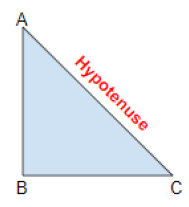
在上图中,三角形的 AC 边是斜边。
计算斜边的公式为:
$$H = \sqrt{x^2+Y^2}$$
语法
Data type hypot(data type X, data type Y);
参数
hypot( ) 接受两个或三个参数 X、Y。
示例
Inputs: X=3 Y=4
Output: 5
Input: X=12 Y=5
Output: 13
返回值
(X2 + Y2) 的平方根
可遵循的方法
首先,我们初始化两个变量。
然后我们定义 hypot( ) 函数。
然后我们打印平方根。
使用上述方法,我们可以计算两个变量的平方和的平方根。它是根据公式 h=sqrt(x2+y2) 计算的。
示例
// c++ program to demonstrate the working of hypot( ) function
#include<cmath.h>
#include<iostream.h>
Using namespace std;
int main( ){
   // initialize the two values
   int a=3, b=4, c;
   cout<< “ A= ”<< a << “B= ” << b;
   // define the hypot( ) function
   c = hypot(a, b);
   cout << “C= “ <<c<<endl;
   double x, y, z;
   x=12;
   y=5;
   cout<< “X=”<<x<< “Y=”<<y;
   z = hypot(x, y);
   cout<< “Z= “<<z;
   return 0;
}
输出
如果我们运行上面的代码,它将生成以下输出
OUTPUT - A=3 B=4
   C= 5
OUTPUT - X=12 Y=5
   Z=13
hypotf( ) 函数
hypotf( ) 函数执行与 hypot 函数相同的任务。但不同之处在于 hypotf( ) 函数返回浮点型数据。参数也是浮点型。它是 `
语法
float hypotf(float x);
示例
Output – X= 9.34 Y=10.09
   Z= 13.75
Output – X= 12.75 Y=5.56
   Z= 13.90956
可遵循的方法
首先,我们用浮点型数据初始化两个变量。
然后我们定义 hypotf( ) 函数。
然后我们打印平方根。
通过以上方法,我们可以计算平方根。
示例
// c++ program to demonstrate the working of hypotf( ) function
#include<iostream.h>
#include<cmath.h>
Using namespace std;
int main( ){
   float x = 12.75, y = 5.56, z;
   cout<< “X= “<<x<< “Y= “ <<y;
   z = hypotf(x, y);
   cout << “Z= “<<z;
   return 0;
}
输出
如果我们运行上面的代码,它将生成以下输出
OUTPUT – X= 12.75 Y=5.56
   Z=13.90956
OUTPUT – X=9.34 Y=10.09
   Z= 13.75
hypotl( ) 函数
hypotl( ) 函数执行与 hypotl( ) 函数相同的任务,但不同之处在于 hypotl( ) 函数返回长双精度型数据。参数也是长双精度型数据。它是 `
语法
长双精度型 hypotl(长双精度型 z)
示例
Output – X= 9.34 Y=10.09
Z= 13.75
Output – X= 12.75 Y=5.56
Z= 13.90956
可遵循的方法
首先,我们用长双精度型数据初始化两个变量。
然后我们定义 hypotl( ) 函数。
然后我们打印平方根。
通过以上方法,我们可以计算平方根。
示例
// c++ program to demonstrate the working of hypotl( ) function
#include<iostream.h>
#include<cmath.h>
Using namespace std;
int main( ){
   long double x = 9.342553435, y = 10.0987456456, z;
   cout<< “X= “<<x<< “Y= “ <<y;
   z = hypotl(x, y);
   cout<< “Z= “<<z;
   return 0;
}
输出
如果我们运行上面的代码,它将生成以下输出
OUTPUT – X= 9.3425453435 Y=10.0987456456
   Z=13.7575
OUTPUT – X= 12.5854555 Y=5.125984
   Z= 184.6694021107363

更新于:2020年2月28日
浏览量 158 次

广告