
 数据结构
数据结构 网络
网络 关系数据库管理系统
 操作系统
操作系统 Java
Java MS Excel
 iOS
iOS HTML
HTML CSS
CSS Android
 Python
 C 编程
C 编程 C++
C++ C#
C# MongoDB
 MySQL
MySQL Javascript
 PHP
PHP 物理学
物理学 化学
化学 生物学
生物学 数学
数学 英语
英语 经济学
经济学 心理学
心理学 社会学
社会学 时尚研究
时尚研究 法律研究
法律研究嵌套弹性容器时弹性属性的正确使用
弹性容器始终是父容器,弹性项始终是子级。弹性格式化上下文的范围仅限于父级/子级关系。
弹性容器的后代(除了子代之外)不属于弹性布局,不会接受弹性属性。有某些弹性属性仅适用于弹性容器 −
- justify-content(对齐内容)
- flex-wrap(弹性换行)和
- flex-direction(弹性方向)
有某些弹性属性仅适用于弹性项”
- align-self(自对齐)
- flex-grow(弹性增长)
- flex(弹性)
请始终将 display: flex 或 display: inline-flex 应用于父级,以便将弹性属性应用于子级。
现在让我们看一个示例。我们的父级 div parentBox 中有两个 div −
<div class='parentBox'>
   <div class='childBox'>
      <div class='babyChildBox'>Parent's Child</div>
      <div class='babyChildBox'>Parent's Child</div>
   </div>
      <! - - -

      !-->
</div>
父容器的样式。我们已经使用 CSS 弹性速写属性 −
.parentBox {
   display: flex;
   flex: 1 0 100%;
   background-color:yellow;
   border: 3px solid skyblue;
}
对于子级(即 childBox),我们再次使用速写属性在弹性项上设置弹性长度 −
.childBox {
   flex: 1 1 50%
   background-color: green;
   color: white;
   border: 1px solid blue;
}
上述 .childBox 中的嵌套子级已设置了弹性。这和上面将弹性容器嵌套在一起 −
.babyChildBox {
   flex: 1 1 50%;
   background-color: orange;
}
示例
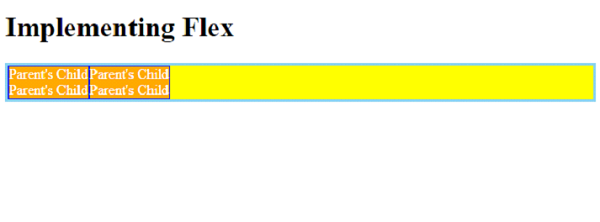
现在让我们看一个完整的示例,以正确嵌套弹性容器 −
<!DOCTYPE html>
<html>
<head>
   <style>
      .parentBox {
         display: flex;
         flex: 1 0 100%;
         background-color:yellow;
         border: 3px solid skyblue;
      }
      .childBox {
         flex: 1 1 50%
         background-color: green;
         color: white;
         border: 1px solid blue;
      }
      .babyChildBox {
         flex: 1 1 50%;
         background-color: orange;
      }
   </style>
</head>
<body>
   <h1>Implementing Flex</h1>
   <div class='parentBox'>
      <div class='childBox'>
         <div class='babyChildBox'>Parent's Child</div>
         <div class='babyChildBox'>Parent's Child</div>
      </div>
      <div class='childBox'>
         <div class='babyChildBox'>Parent's Child</div>
         <div class='babyChildBox'>Parent's Child</div>
      </div>
   </div>
</body>
</html>
输出

更新于: 2022 年 12 月 6 日
1K+ 浏览量

推广