
 数据结构
数据结构 网络
网络 RDBMS
RDBMS 操作系统
操作系统 Java
Java MS Excel
 iOS
iOS HTML
HTML CSS
CSS Android
 Python
 C 编程
C 编程 C++
C++ C#
C# MongoDB
 MySQL
MySQL Javascript
 PHP
PHP 物理学
物理学 化学
化学 生物学
生物学 数学
数学 英语
英语 经济学
经济学 心理学
心理学 社会学
社会学 时尚学
时尚学 法律学
法律学JavaScript 中的访问器属性及自定义属性。
访问器属性帮助我们在 JavaScript 中实现 getter 和 setter 函数。在获取或设置值时会执行函数。
访问器属性有四个属性−
- get − 在读取属性时调用。它不接受任何参数。
- set − 在设置属性时调用。它只接受一个参数。
- enumerable − 设置为 true 时允许对象可迭代。
- configurable − 设置为 false 时,不允许删除属性或更改其值。
以下是访问器属性及其属性的代码 -
示例
<!DOCTYPE html>
<html lang="en">
<head>
<meta charset="UTF-8" />
<meta name="viewport" content="width=device-width, initial-scale=1.0" />
<title>Document</title>
<style>
   body {
      font-family: "Segoe UI", Tahoma, Geneva, Verdana, sans-serif;
   }
   .result {
      font-size: 20px;
      font-weight: 500;
      color: blueviolet;
   }
</style>
</head>
<body>
<h1>Accessor property and its attributes</h1>
<div class="result"></div>
<br />
<button class="Btn">CLICK HERE</button>
<h3>Click on the above button to use set and get to modify and display person object properties</h3>
<script>
   let resEle = document.querySelector(".result");
   let BtnEle = document.querySelector(".Btn");
   let person = {
      name: "Rohan",
      age: 22,
      occupation: "Student",
      get fullname() {
         return this.name;
      },
      set job(occupation) {
         this.occupation = occupation;
      },
   };
   BtnEle.addEventListener("click", () => {
      resEle.innerHTML =
      "Name = " + person.fullname + " : Occupation = " + person.occupation;
      resEle.innerHTML += "<br>After modifying occupation property <br>";
      person.occupation = "Developer";
      resEle.innerHTML += "New Occupation = " + person.occupation;
   });
</script>
</body>
</html>
输出
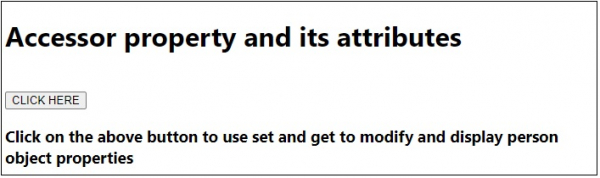
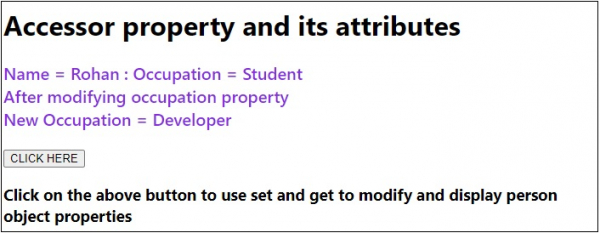
单击“单击此处”按钮后−

更新时间:20-7-2020
165 浏览量

广告