
 数据结构
数据结构 网络
网络 RDBMS
RDBMS 操作系统
操作系统 Java
Java MS Excel
 iOS
iOS HTML
HTML CSS
CSS Android
 Python
 C 编程
C 编程 C++
C++ C#
C# MongoDB
 MySQL
MySQL Javascript
 PHP
PHP 物理
物理 化学
化学 生物
生物 数学
数学 英语
英语 经济学
经济学 心理学
心理学 社会学
社会学 时尚学
时尚学 法律学
法律学在 Tkinter 中向选中文本添加彩色文本
如果我们想在一个可接受多行用户输入的应用程序中实现文本编辑器,那么我们可以使用Tkinter 文本小部件。Tkinter 中的文本小部件通常用于为应用程序创建文本编辑器,在应用程序中我们可以写入文本并执行选择、编辑和创建特定文本等操作。
如果您想强调文本并为强调的文本提供颜色,那么您可以使用tag_add("start", "first", "second")方法。tag_add()方法接收两个参数,用于从文本小部件中选择指定文本。您可以通过使用tag_configure()方法配置标签来为强调的文本赋予背景色。
示例
# Import the required library
from tkinter import *

# Create an instance of tkinter frame or window
win = Tk()

# set the size of the window
win.geometry("700x350")

# Create a new frame
frame= Frame(win)

# Add a text widget
text= Text(frame)

# insert a new text
text.insert(INSERT, "Hello, Welcome to TutorialsPoint.com")
text.pack()

# Add a tag to the specified text
text.tag_add("start", "1.8", "1.35")
text.tag_configure("start", background= "black", foreground= "yellow")
frame.pack()

win.mainloop()
输出
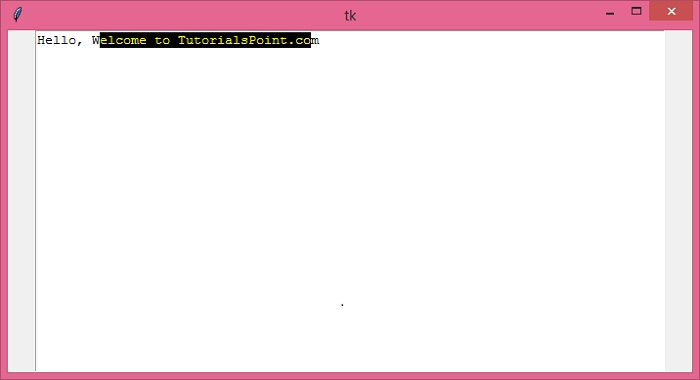
运行以上代码将显示一个小部件,其中包含一些强调的文本。

更新于: 16-Dec-2021
1K+ 浏览次数

广告