
 数据结构
数据结构 网络
网络 关系型数据库管理系统
 操作系统
操作系统 Java
Java MS Excel
 iOS
iOS HTML
HTML CSS
CSS Android
 Python
 C 编程
C 编程 C++
C++ C#
C# MongoDB
 MySQL
MySQL Javascript
 PHP
PHP 物理学
物理学 化学
化学 生物学
生物学 数学
数学 英语
英语 经济学
经济学 心理学
心理学 社会学
社会学 时尚学
时尚学 法律学
法律学JavaScript 中的 Array findIndex() 函数
JavaScript 中的 findIndex() 函数返回数组中第一个满足给定条件的元素值。
以下为数组 find() 函数的代码 −
示例
<!DOCTYPE html>
<html lang="en">
<head>
<meta charset="UTF-8" />
<meta name="viewport" content="width=device-width, initial-scale=1.0" />
<title>Document</title>
<style>
   body {
      font-family: "Segoe UI", Tahoma, Geneva, Verdana, sans-serif;
   }
   .findIndex {
      font-size: 20px;
      font-weight: 500;
   }
</style>
</head>
<body>
<h1>JavaScript Array FindIndex() example</h1>
<div class="findIndex"></div>
<button class="findArr">CLICK HERE</button>
<h3>Click on the above button to get the index of lion in the array</h3>
<script>
   function findLion(animal) {
      return animal === "lion";
   }
   let fillEle = document.querySelector(".findIndex");
   let arr = ["cow", "lion", "bull", "tiger"];
   fillEle.innerHTML = arr;
   document.querySelector(".findArr").addEventListener("click", () => {
      fillEle.innerHTML = arr.findIndex(findLion);
   });
</script>
</body>
</html>
输出
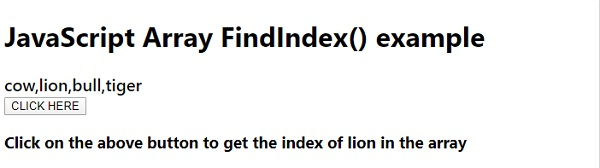
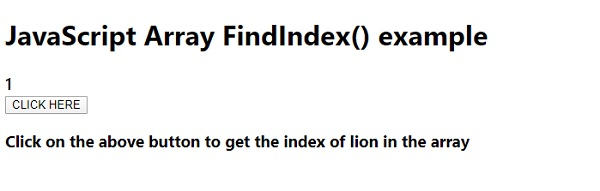
点击 “点击这里” 按钮后,将如下所示返回狮子所在的索引 −

更新于: 2020 年 5 月 8 日
1000+ 浏览

广告