
 数据结构
数据结构 网络
网络 关系数据库管理系统(RDBMS)
 操作系统
操作系统 Java
Java MS Excel
 iOS
iOS HTML
HTML CSS
CSS Android
 Python
 C语言编程
C语言编程 C++
C++ C#
C# MongoDB
 MySQL
MySQL Javascript
 PHP
PHP 物理学
物理学 化学
化学 生物学
生物学 数学
数学 英语
英语 经济学
经济学 心理学
心理学 社会学
社会学 服装设计
服装设计 法学
法学Python生日提醒应用
在本节中,我们将学习如何使用Python创建一个生日提醒应用程序。
问题陈述
创建一个使用Python的应用程序,该应用程序可以检查当天是否有生日。如果当天是名单上某个人的生日,则向系统发送包含该人姓名的通知。
我们需要一个文件,我们可以将日期、月份和人员姓名存储在这个文件中,作为该应用程序的查找文件。该文件如下所示:
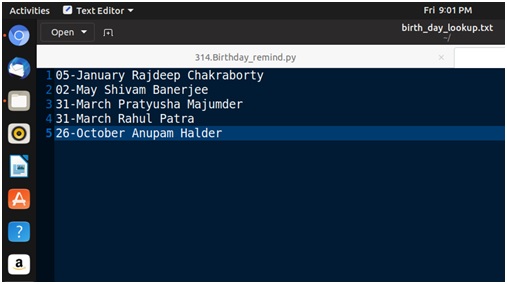
我们将把这个应用程序转换为一个启动应用程序,以便在系统启动时启动。
创建生日提醒应用程序的步骤
- 获取查找文件并从中读取。
- 检查日期和月份是否与当前日期和月份匹配。
- 向系统发送通知,通知所有今天过生日的人的姓名。
- 停止
示例代码
importos, time
#Take the birthday lookup file from home directory
file_path = os.getenv('HOME') + '/birth_day_lookup.txt'
defcheck_birthday():
   lookup_file = open(file_path, 'r') #open the lookup file as read mode
   today = time.strftime('%d-%B') #get the todays date as dd-Month format
   bday_flag = 0
   #loop through each entry in the birthday file, and check whether the day is present or not
   for entry inlookup_file:
      if today in entry:
         line = entry.split(' ') #cut the line on spaces to get name and surname
         bday_flag = 1
         os.system('notify-send "Today is '+line[1]+' '+line[2]+''s Birthday"')
   ifbday_flag == 0:
      os.system('notify-send "No birthday for today is listed"')
check_birthday()
输出
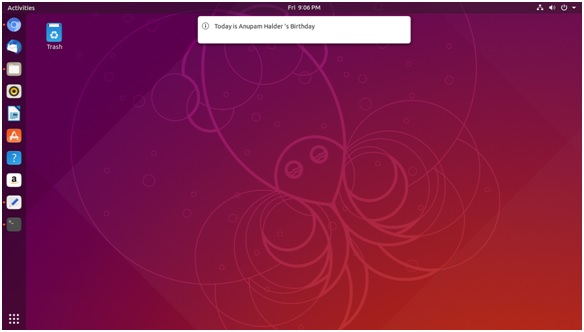
将生日提醒设置为启动应用程序的步骤
步骤1 - 使用chmod命令将脚本文件转换为可执行文件。
sudochmod +x file_name.py
步骤2 - 将脚本文件移动到/usr/bin目录。
sudocp file_name.py /usr/bin
步骤3 - 现在搜索启动应用程序,并启动它。
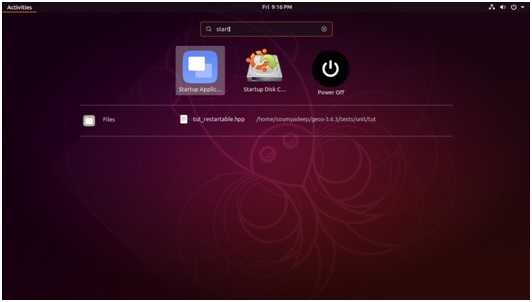
打开应用程序后,转到添加,输入所需名称,然后在命令字段中输入程序名称。并将其添加为启动应用程序。
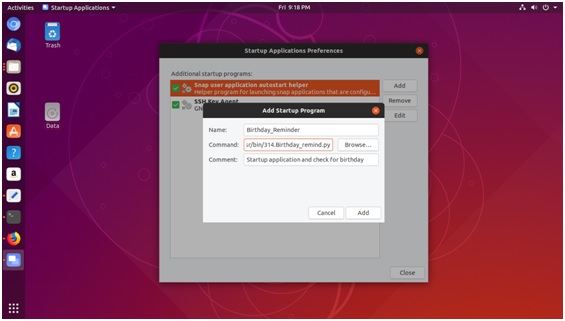

更新于:2019年7月30日
680 次浏览

广告