
 数据结构
数据结构 网络
网络 RDBMS
RDBMS 操作系统
操作系统 Java
Java MS Excel
 iOS
iOS HTML
HTML CSS
CSS Android
 Python
 C 编程
C 编程 C++
C++ C#
C# MongoDB
 MySQL
MySQL Javascript
 PHP
PHP 物理学
物理学 化学
化学 生物学
生物学 数学
数学 英语
英语 经济学
经济学 心理学
心理学 社会学
社会学 时尚学
时尚学 法律学
法律学使用 CSS 控制表格标题的位置
CSS caption-side 属性用于垂直定位表格标题框。它的取值可以是 top 和 bottom。默认情况下,将表格标题放在顶部。
语法
CSS 列表样式属性的语法如下:
Selector {
   caption-side: /*value*/
}
示例
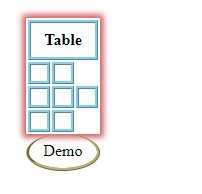
以下示例演示了 CSS caption-side 属性。
<!DOCTYPE html>
<html>
<head>
<style>
table * {
   border: ridge skyblue;
   padding: 0.5rem;
}
table {
   margin: 20px;
   box-shadow: 0 0 6px 3px indianred;
   empty-cells: show;
}
caption {
   border-top-style: none;
   caption-side: bottom;
   border-color: darkkhaki;
   border-radius: 50%;
}
</style>
</head>
<body>
<table id="demo">
<caption>Demo</caption>
<tr>
<th colspan="3">Table</th>
</tr>
<tr>
<td></td>
<td></td>
</tr>
<tr>
<td></td>
<td></td>
<td></td>
</tr>
<tr>
<td></td>
<td></td>
</tr>
</table>
</body>
</html>
输出
将给以下输出:
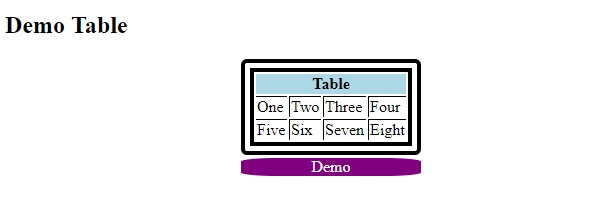
示例
<!DOCTYPE html>
<html>
<head>
<style>
table {
   margin: auto;
   border: double black 13px;
   border-radius: 6px;
}
td, th {
   border-left: 1px solid black;
   border-top: 1px solid black;
}
th {
   background-color: lightblue;
   border-top: none;
}
td:first-child, th:first-child {
   border-left: none;
}
caption {
   margin-top: 3px;
   background-color: purple;
   caption-side: bottom;
   color: white;
   border-radius: 20%;
}
</style>
</head>
<body>
<h2>Demo Table</h2>
<table>
<caption>Demo</caption>
<tr>
<th colspan="4">Table</th>
</tr>
<tr>
<td>One...</td>
<td>Two...</td>
<td>Three</td>
<td>Four</td>
</tr>
<tr>
<td>Five</td>
<td>Six</td>
<td>Seven</td>
<td>Eight</td>
</tr>
</table>
</body>
</html>
输出
将给以下输出:

更新日期:06-Jan-2020
618 浏览

广告