
 数据结构
数据结构 网络
网络 RDBMS
RDBMS 操作系统
操作系统 Java
Java MS Excel
 iOS
iOS HTML
HTML CSS
CSS Android
 Python
 C 编程
C 编程 C++
C++ C#
C# MongoDB
 MySQL
MySQL Javascript
 PHP
PHP 物理
物理 化学
化学 生物学
生物学 数学
数学 英语
英语 经济学
经济学 心理学
心理学 社会学
社会学 时尚研究
时尚研究 法律研究
法律研究在 SAP ABAP 中创建数据库视图
在 ABAP 中,你可以利用功能模块 - DDIF_VIEW_PUT 和 DDIF_VIEW_ACTIVATE 进行视图激活。所有表格参数都应正确定义,否则会导致创建过程中出现错误。
DDIF_VIEW_PUT − ABAP 字典中写入视图的接口。
可以参阅以下链接了解更多详细信息 −
http://www.se80.co.uk/sapfms/d/ddif/ddif_view_put.htm
CALL FUNCTION 'DDIF_VIEW_PUT' "DD: ABAP 字典中写入视图的接口
EXPORTING
name = " ddname Name of the view to be written
* dd25v_wa = ' ' " dd25v View header
* dd09l_wa = ' ' " dd09v Technical settings of the view
* TABLES
* dd26v_tab = " dd26v Basis tables of the view
* dd27p_tab = " dd27p View fields
* dd28j_tab = " dd28j Join conditions of the view
* dd28v_tab = " dd28v Selection conditions of the view

EXCEPTIONS
VIEW_NOT_FOUND = 1 " Header of the view could not be found
NAME_INCONSISTENT = 2 " Name in Sources Inconsistent with NAME
VIEW_INCONSISTENT = 3 " Inconsistent Sources
PUT_FAILURE = 4 " Write Error (ROLLBACK Recommended)
PUT_REFUSED = 5 " Write not Allowed

. " DDIF_VIEW_PUT
DDIF_VIEW_ACTIVATE: Interface for activating a view
EXPORTING

name = " ddname Name of view to be activated
* auth_chk = 'X' " ddbool_d 'X': Perform authorization check for DB operations
* prid = -1 " sy-tabix ID for Log Writer
IMPORTING
rc = " sy-subrc Result of Activation
EXCEPTIONS

NOT_FOUND = 1 "View not found
PUT_FAILURE = 2 "View could not be written
. " DDIF_VIEW_ACTIVATE
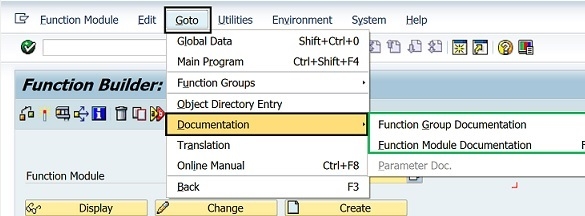
这两个视图都可以在 T 代码:SE80 或 SE37 中使用。你可以使用这两个事务来显示 SAP 系统中可用的 SAP 功能模块文档。
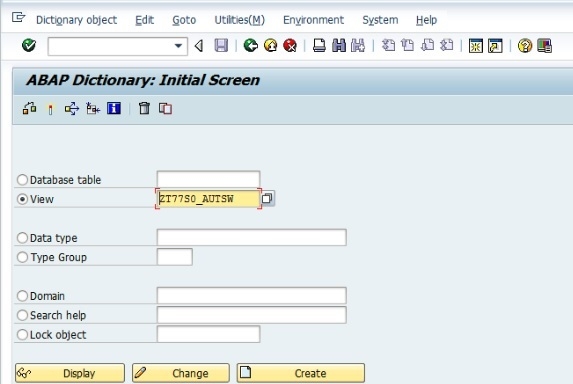
你还可以如下所示在 SAP ABAP 中创建事务代码 SE11 的视图
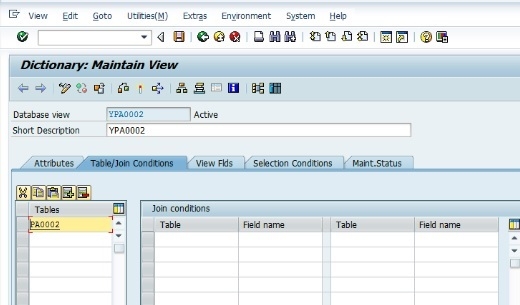
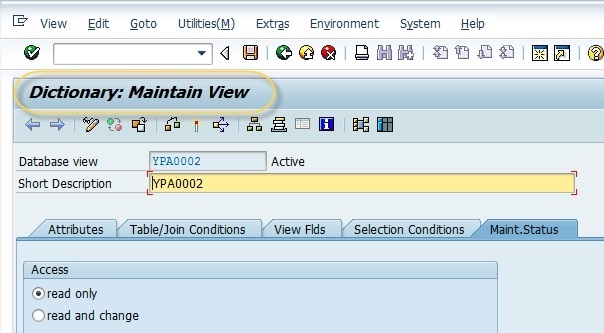
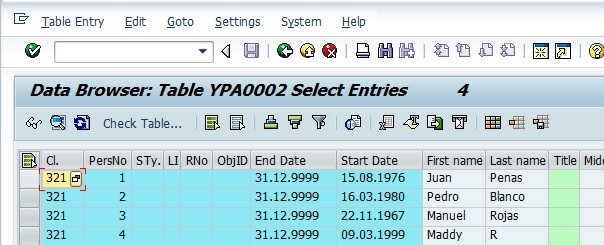
你必须维护和激活视图。一旦激活,你就可以查看标准事务代码 SE16 的内容,如下所示 −

更新于: 25 日 2 月 2020
931 次观看

广告