
 数据结构
数据结构 网络
网络 关系型数据库管理系统
 操作系统
操作系统 Java
Java MS Excel
 iOS
iOS HTML
HTML CSS
CSS Android
 Python
 C 编程
C 编程 C++
C++ C#
C# MongoDB
 MySQL
MySQL Javascript
 PHP
PHP 物理
物理 化学
化学 生物
生物 数学
数学 英语
英语 经济学
经济学 心理学
心理学 社会学
社会学 服装设计
服装设计 法律
法律JavaScript 中 document load 和 DOMContentLoaded 事件的区别
要验证网页是否已完全加载,可以使用 DOMContentLoaded 和 load 事件。但是,有一些因素会影响人们选择其中一个而不是另一个。让我们看一下这两个事件,并了解它们的功能。
当 DOMContentLoaded 事件触发时,基本 HTML 页面已加载并完成解析。此事件不会延迟样式表、子框架和其他附加组件(如照片和图片),直到它们完成加载。
当页面完全加载时,应该触发另一个名为 load 的事件。当 DOMContentLoaded 更合适时,使用 load 是一种常见的习惯。
同步 JavaScript 会暂停 DOM 解析。如果希望在用户请求页面后尽快解析 DOM,则可以将 JavaScript 设为异步,并优化样式表加载。通常情况下,样式表会与主 HTML 内容同时加载,从而“窃取”主内容的流量,并减慢 DOM 解析速度。
语法
document.addEventListener("DOMContentLoaded", function(e) {
   console.log("GfG page has loaded");
});
示例
在这个例子中,让我们了解一下指示网页 DOM 加载完成的消息。它显示在控制台日志窗口中,如下面的结果所示。
<!DOCTYPE html>
<html>
<title>Difference between document load and DOMContentLoaded events in JavaScript - TutorialsPoint
</title>
<head>
   <meta charset="UTF-8">
   <meta http-equiv="X-UA-Compatible" content="IE=edge">
   <meta name="viewport" content="width=device-width, initial-scale=1.0">
   <script type="text/javascript">
      document.addEventListener("DOMContentLoaded", function(e) {
         console.log("TutorialsPoint page has loaded for you");
      });
   </script>
</head>
<body style="text-align: center">
   <h3>Join one of the world’s largest online learning marketplaces.</h3>
   <br>
   <img src="https://tutorialspoint.com/images/logo.png">
</body>
</html>
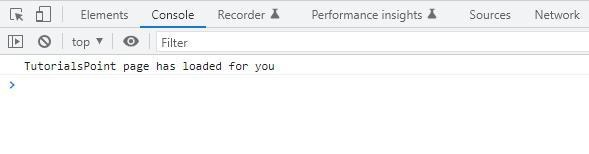
使用 DOMContentLoaded 事件的优势包括
当消息或内容显示速度快得多时,用户体验会得到增强。
页面加载所需时间更少。
文档加载 - load 事件使用不同的执行方法。当网页的所有元素(包括 DOM 层次结构和相关功能,如 CSS 和 JavaScript 文件、图像和照片以及外部链接)都已加载时,此事件完成。因此,load 事件主要用于确定页面何时完全加载。
语法
document.addEventListener("DOMContentLoaded", function(e) {
   console.log("GfG page has loaded");
});
示例
load 事件在整个网页(HTML)以及所有补充资源(如 JavaScript、CSS 和图片)完全加载后,针对窗口对象触发。您使用 addEventListener() 函数创建事件监听器来处理 load 事件。
从历史上看,我们使用 load 事件在文档加载后执行脚本。但是,还有一些其他情况可能更合适。
DOMContentLoaded 和 load 是两个主要事件。根据 JavaScript.info 的说法,前者在浏览器加载所有外部资源(包括图像和样式表)但尚未构建 DOM 树时触发,而后者在加载所有外部资源(包括图像和样式表)时触发。
<!DOCTYPE html>
<html>
<title>Difference between document load and DOMContentLoaded events in JavaScript - TutorialsPoint
</title>
<head>
   <meta charset="UTF-8">
   <meta http-equiv="X-UA-Compatible" content="IE=edge">
   <meta name="viewport" content="width=device-width, initial-scale=1.0">
   <script type="text/javascript">
      document.addEventListener("load", function(e) {
         console.log("TutorialsPoint page has loaded completely for you");
      });
   </script>
</head>
<body style="text-align: center">
   <h3>Enroll now in the most popular and best rated courses at TutorialsPoint.</h3>
   <br>
   <img src="https://tutorialspoint.com/images/logo.png">
</body>
</html>
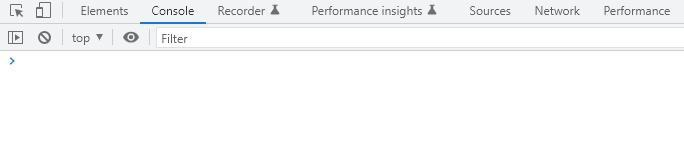
使用 load 事件的优势
此事件有助于确定网页的每个元素何时加载。
示例
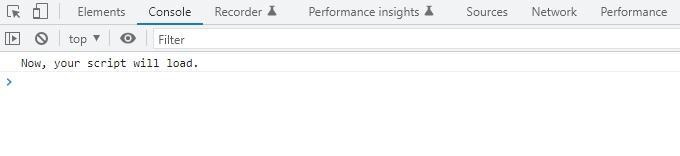
窗口对象表示浏览器窗口。当元素完成加载时,onload 属性处理 load 事件。这与窗口元素一起使用,以便在网页加载完成后运行脚本。此属性的处理程序函数设置为需要运行的函数。网页加载后,该函数将立即执行。
语法
window.onload = function exampleFunction() {
   // Function to be executed
}
示例
<!DOCTYPE html>
<html>
<title>Difference between document load and DOMContentLoaded events in JavaScript - TutorialsPoint
</title>
<head>
   <meta charset="UTF-8">
   <meta http-equiv="X-UA-Compatible" content="IE=edge">
   <meta name="viewport" content="width=device-width, initial-scale=1.0">
</head>
<body style="text-align:center">
   <h2 style="color: rgb(6, 94, 119)">
      Learn JavaScript with TutorialsPoint! </h2>
   <strong>
      In javascrip, how do I start a function when the page loads?
   </strong>
   <p>
      The script has been already executed up. For the output, look at the console.
   </p>
   <script>
      window.onload = function exampleFunction() {
         console.log('Now, your script will load.');
      }
   </script>
</body>
</html>

3K+ 浏览量
