
 数据结构
数据结构 网络
网络 关系数据库管理系统(RDBMS)
 操作系统
操作系统 Java
Java MS Excel
 iOS
iOS HTML
HTML CSS
CSS Android
 Python
 C语言编程
C语言编程 C++
C++ C#
C# MongoDB
 MySQL
MySQL Javascript
 PHP
PHP 物理
物理 化学
化学 生物
生物 数学
数学 英语
英语 经济学
经济学 心理学
心理学 社会学
社会学 服装设计
服装设计 法学
法学如何在Swift中创建属性字符串?
本文将解释如何在Swift语言中创建属性字符串。在Swift中,如何为字符串应用不同的属性?
在Swift中,我们使用NSAttributedString类来创建属性字符串。
在Swift中,NSAttributedString是一个用于创建和管理属性字符串的类。属性字符串是指应用了附加属性(例如文本颜色、字体和样式)的字符串。
本文将展示属性字符串的不同用例。
基本设置
import UIKit
class TestController: UIViewController {
    private let attributedLabel = UILabel()

    override func viewDidLoad() {
        super.viewDidLoad()
        initialSetup()
    }
    private func initialSetup() {

        // basic setup
        view.backgroundColor = .white
        navigationItem.title = "NSAttributedString"


        // attributedLabel customization
        attributedLabel.numberOfLines = 0
        attributedLabel.backgroundColor = UIColor(white: 0, alpha: 0.1)

        view.addSubview(attributedLabel)
        attributedLabel.translatesAutoresizingMaskIntoConstraints = false
        attributedLabel.leadingAnchor.constraint(equalTo: view.leadingAnchor, constant: 30).isActive = true
        attributedLabel.trailingAnchor.constraint(equalTo: view.trailingAnchor, constant: -30).isActive = true
        attributedLabel.topAnchor.constraint(equalTo: view.safeAreaLayoutGuide.topAnchor, constant: 30).isActive = true
        attributedLabel.heightAnchor.constraint(equalToConstant: 300).isActive = true
    }
}
解释
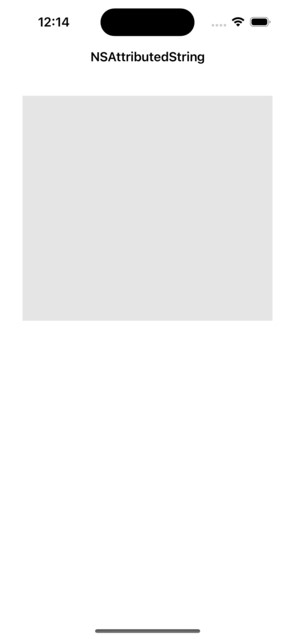
在上面的代码中,我们设置了一个名为TestController的视图控制器来显示UILabel类的不同属性文本。
输出
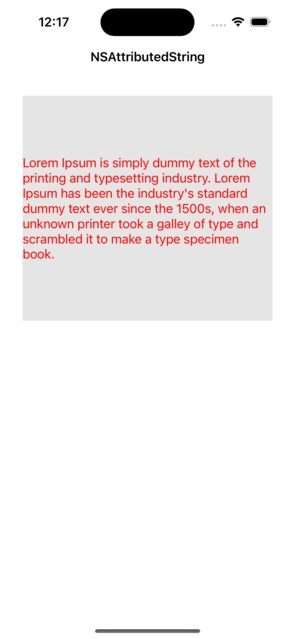
如何为整个字符串应用颜色?
在这个例子中,您将看到如何为整个字符串应用颜色。以下是如何在Swift中创建具有不同属性的NSAttributedString对象的示例:
private func example1() {
   let string = "Lorem Ipsum is simply dummy text of the printing and typesetting industry. Lorem Ipsum has been the industry's standard dummy text ever since the 1500s, when an unknown printer took a galley of type and scrambled it to make a type specimen book."
   let attributes: [NSAttributedString.Key: Any] = [.foregroundColor: UIColor.red,
   let attributedString = NSAttributedString(string: string, attributes: attributes)
   attributedLabel.attributedText = attributedString
}
输出
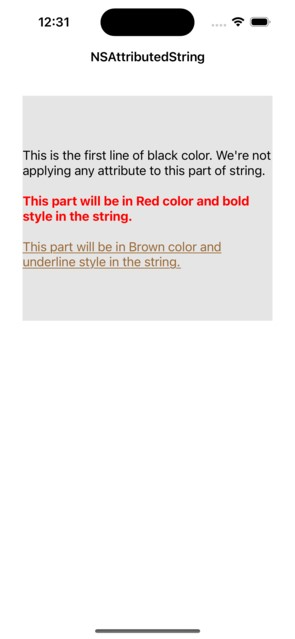
如何为整个字符串应用不同的颜色和字体样式?
在这个例子中,您将看到如何为字符串应用不同的颜色和字体样式。以下是如何在Swift中创建具有不同属性的NSAttributedString对象的示例:
private func example2() {
   // first part
   let attributedString = NSMutableAttributedString(string: "This is the first line of black color. We're not applying any attribute to this part of string.",
      attributes: [.foregroundColor: UIColor.black, font: UIFont.systemFont(ofSize: 17)])

   // appending new lines
   attributedString.append(NSAttributedString(string: "\n\n"))

   // second part
   attributedString.append(NSAttributedString(string: "This part will be in Red color and bold style in the string.", attributes: [.foregroundColor: UIColor.red, .font: UIFont.systemFont(ofSize: 17, weight: .bold)]))

   // appending new lines
   attributedString.append(NSAttributedString(string: "\n\n"))

   // third part
   attributedString.append(NSAttributedString(string: "This part will be in Brown color and underline style in the string.", attributes: [.foregroundColor: UIColor.brown, .font: UIFont.systemFont(ofSize: 17), .underlineStyle: 1]))

   attributedLabel.attributedText = attributedString
}
输出
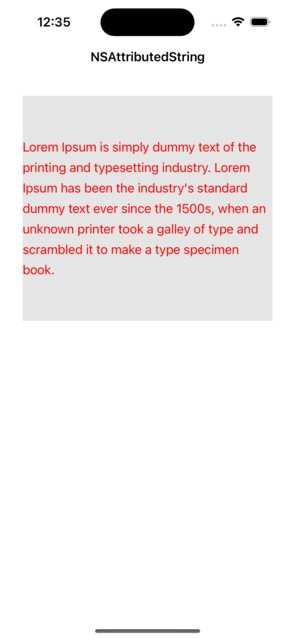
如何为整个字符串应用行间距?
在许多情况下,您必须为字符串应用一些行间距才能正确显示多行文本。Swift提供NSMutableParagraphStyle类来添加行之间的间距。以下是如何在Swift中将段落样式应用于字符串的示例:
private func example3() {
   let string = "Lorem Ipsum is simply dummy text of the printing and typesetting industry. Lorem Ipsum has been the industry's standard dummy text ever since the 1500s, when an unknown printer took a galley of type and scrambled it to make a type specimen book."
   let paragraph = NSMutableParagraphStyle()
   paragraph.lineSpacing = 7
   let attributes: [NSAttributedString.Key: Any] = [.foregroundColor: UIColor.red,
      .font: UIFont.systemFont(ofSize: 17),
      .paragraphStyle: paragraph]
   let attributedString = NSAttributedString(string: string, attributes: attributes)
   attributedLabel.attributedText = attributedString
}
输出
结论
在真实的iOS应用程序中,属性字符串是一个非常有用且常用的功能。您可以为字符串应用不同的样式。此外,您还可以将各种样式应用于子字符串。

更新于:2023年9月7日
499 次浏览

广告