
 数据结构
数据结构 网络
网络 关系型数据库管理系统
 操作系统
操作系统 Java
Java MS Excel
 iOS
iOS HTML
HTML CSS
CSS Android
 Python
 C 编程
C 编程 C++
C++ C#
C# MongoDB
 MySQL
MySQL Javascript
 PHP
PHP 物理
物理 化学
化学 生物
生物 数学
数学 英语
英语 经济学
经济学 心理学
心理学 社会学
社会学 时尚研究
时尚研究 法律研究
法律研究如何向 JavaFX 中的节点应用线性渐变(颜色)?
在 JavaFX 中,可以使用 setFill() 方法给形状添加颜色,为几何形状或背景内部添加颜色。
此方法将 javafx.scene.paint.Paint 类的对象作为参数。它是用于填充形状和背景颜色的颜色和渐变的基础类。
JavaFX 中的 javafx.scene.paint.LinearGradient 类是 Paint 的子类,可以使用它用圆形线性渐变图案填充形状。
要向几何形状应用径向渐变图案:
传递所需参数,实例化 LinearGradient 类。
使用 setFill() 方法将创建的渐变设置到形状中。
示例
import javafx.application.Application;
import javafx.scene.Group;
import javafx.scene.Scene;
import javafx.scene.paint.Color;
import javafx.scene.paint.CycleMethod;
import javafx.scene.paint.LinearGradient;
import javafx.scene.paint.Stop;
import javafx.stage.Stage;
import javafx.scene.shape.Circle;
import javafx.scene.shape.Ellipse;
import javafx.scene.shape.Polygon;
import javafx.scene.shape.Rectangle;
public class LinearGradientExample extends Application {
   public void start(Stage stage) {
      //Drawing a circle
      Circle circle = new Circle(75.0f, 65.0f, 40.0f );
      //Drawing a Rectangle
      Rectangle rect = new Rectangle(150, 30, 100, 65);
      //Drawing an ellipse
      Ellipse ellipse = new Ellipse(330, 60, 60, 35);
      //Drawing Polygon
      Polygon poly = new Polygon(410, 60, 430, 30, 470, 30, 490, 60, 470, 100, 430, 100 );
      //Setting the linear gradient
      Stop[] stops = new Stop[] {
         new Stop(0, Color.DARKSLATEBLUE),
         new Stop(1, Color.DARKRED)
      };
      LinearGradient gradient =
      new LinearGradient(0, 0, 1, 0, true, CycleMethod.NO_CYCLE, stops);
      //Setting the pattern
      circle.setFill(gradient);
      circle.setStrokeWidth(3);
      circle.setStroke(Color.CADETBLUE);
      rect.setFill(gradient);
      rect.setStrokeWidth(3);
      rect.setStroke(Color.CADETBLUE);
      ellipse.setFill(gradient);
      ellipse.setStrokeWidth(3);
      ellipse.setStroke(Color.CADETBLUE);
      poly.setFill(gradient);
      poly.setStrokeWidth(3);
      poly.setStroke(Color.CADETBLUE);
      //Setting the stage
      Group root = new Group(circle, ellipse, rect, poly);
      Scene scene = new Scene(root, 600, 150);
      stage.setTitle("Linear Gradient");
      stage.setScene(scene);
      stage.show();
   }
   public static void main(String args[]){
      launch(args);
   }
}
输出
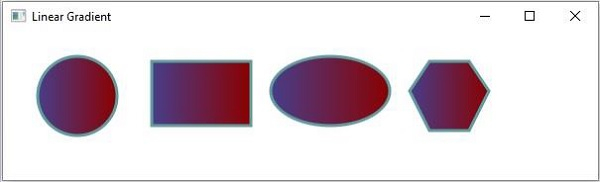

更新于:2020 年 5 月 16 日
896 次浏览

广告