
 数据结构
数据结构 网络
网络 关系型数据库管理系统
 操作系统
操作系统 Java
Java MS Excel
 iOS
iOS HTML
HTML CSS
CSS Android
 Python
 C 编程
C 编程 C++
C++ C#
C# MongoDB
 MySQL
MySQL Javascript
 PHP
PHP 物理学
物理学 化学
化学 生物学
生物学 数学
数学 英语
英语 经济学
经济学 心理学
心理学 社会学
社会学 时尚研究
时尚研究 法律研究
法律研究如何使用 Actions 类在 Selenium 中捕获工具提示?
我们可以使用 Actions 类在 Selenium 中捕获元素上的工具提示。首先,我们将必须创建 Actions 类的对象,然后将 moveToElement 应用于它。
此方法将鼠标移动到我们想要捕获工具提示的元素的中间,然后执行 perform 方法。最后,我们可以借助 getText 方法获取工具提示文本。当具有工具提示文本的元素在其 html 代码中没有 title 属性时,将使用此技术。
语法
WebElement m=driver.findElement(By.linkText("Q/A"));
Actions a = new Actions(driver);
a.moveToElement(m).perform();
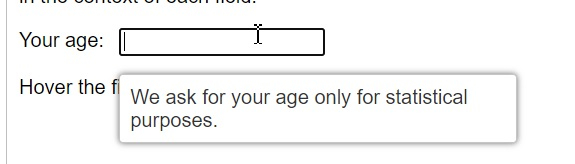
让我们捕获工具提示文本 - 我们仅出于统计目的要求您的年龄,在将鼠标悬停在标签为“您的年龄”的编辑框上时获得。
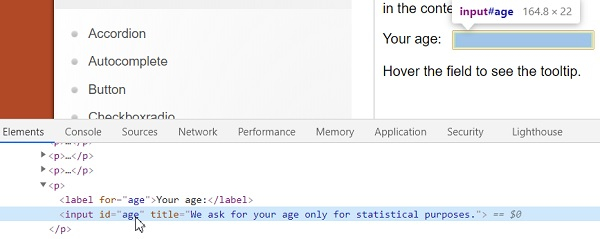
让我们看一下带有工具提示的编辑框的 html 代码。此元素没有 title 属性。
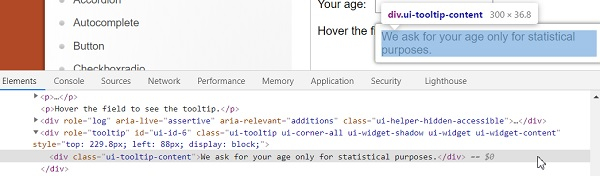
接下来要捕获工具提示的 html 代码,首先点击 F12 在 Chrome 浏览器中打开控制台。然后按 F8 或 Function + F8 使浏览器处于调试器暂停模式。
然后检查工具提示文本以获取其 html 属性。
示例
import org.openqa.selenium.By;
import org.openqa.selenium.WebDriver;
import org.openqa.selenium.WebElement;
import org.openqa.selenium.firefox.FirefoxDriver;
import java.util.concurrent.TimeUnit;
import org.openqa.selenium.interactions.Action;
import org.openqa.selenium.interactions.Actions;
import org.openqa.selenium.JavascriptExecutor;
public class ToolTipActions{
   public static void main(String[] args) {
      System.setProperty("webdriver.gecko.driver",
         "C:\Users\ghs6kor\Desktop\Java\geckodriver.exe");
      WebDriver driver = new FirefoxDriver();
      //implicit wait
      driver.manage().timeouts().implicitlyWait(5, TimeUnit.SECONDS);
      //maximize browser
      driver.manage().window().maximize();
      //URL launch
      driver.get("https://jqueryui.jqueryjs.cn/tooltip/");
      // identify frame then switch to it
      WebElement f=driver.findElement(By.className("demo-frame"));
      driver.switchTo().frame(f);
      //identify element
      WebElement m=driver.findElement(By.xpath("//input[@id='age']"));
      //scroll to element with JavaScript Executor
      JavascriptExecutor js = (JavascriptExecutor) driver;
      js.executeScript("arguments[0].scrollIntoView(true);", m);
      // object of Actions with method moveToElement
      Actions at = new Actions(driver);
      at.moveToElement(m).perform();
      //identify tooltip element
      WebElement n=driver.findElement(By.xpath("//div[@class='ui-tooltip-content']"));
      //get text of tooltip
      String s = n.getText();
      System.out.println("Tooltip is :"+s);
      driver.quit();
   }
}
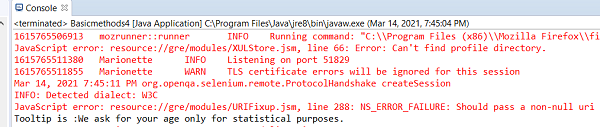
输出

更新于: 2021-04-06
672 次查看

广告