
 数据结构
数据结构 网络
网络 RDBMS
RDBMS 操作系统
操作系统 Java
Java MS Excel
 iOS
iOS HTML
HTML CSS
CSS Android
 Python
 C 编程
C 编程 C++
C++ C#
C# MongoDB
 MySQL
MySQL Javascript
 PHP
PHP 物理
物理 化学
化学 生物
生物 数学
数学 英语
英语 经济
经济 心理学
心理学 社会研究
社会研究 时尚研究
时尚研究 法律研究
法律研究如何在 OpenCV 中使用 C++ 改变图像大小并添加边框?
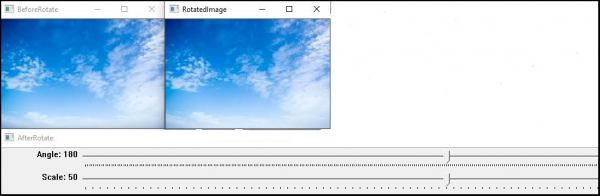
在本专题中,我们将了解轨迹条的另一个应用。在此,我们将使用轨迹条来更改图像大小、为图像添加边框以及使用轨迹条更改边框大小。
使用以下程序,我们可以更改图像大小、添加边框、更改边框大小和旋转图像。这类似于前面的示例。
以下程序演示如何在同一轨迹条中添加多个滑块。
示例
#include<iostream>
#include<opencv2/highgui/highgui.hpp>
#include<opencv2/imgproc/imgproc.hpp>
using namespace std;
using namespace cv;
   int Rotate = 180;//initializing angle//
   int Scale = 50;//initializing scale//
   int Border = 0;//initial Border//
   Mat before_Rotate;//declaring matrix for before rotation//
   int vertical = 0;//initial vertical value//
   int horizontal = 0;//initial horizontal value//
   void rotator(int, void*){ //function to rotate image//
   Mat Rotation = getRotationMatrix2D(Point(horizontal, vertical),(Rotate - 180), Scale / 50.0);//affine transformation matrix for 2D rotation//
   Mat Rotated;//matrix for rotated image
   warpAffine(before_Rotate, Rotated, Rotation, before_Rotate.size(), INTER_LINEAR, Border, Scalar());//applying affine transformation//
   imshow("RotatedImage", Rotated);//show rotated image//
}
int main(int argc,char**argv) {
   before_Rotate = imread("sky.jpg");//loading image in the matrix//
   vertical = before_Rotate.rows / 2;//getting midpoint of vertical pixels//
   horizontal = before_Rotate.cols / 2;//getting midpoints of horizontal pixels//
   namedWindow("BeforeRotate");//declaring window to show image before rotation//
   imshow("BeforeRotate", before_Rotate);//showing image before rotation//
   namedWindow("AfterRotate");//declaring window to show image after rotation//
   createTrackbar("Angle", "AfterRotate", &Rotate, 360, rotator);//creating trackbar for rotation//
   createTrackbar("Scale", "AfterRotate", &Scale, 100, rotator);//creating trackbar to change size//
   createTrackbar("Border Mode", "After Rotate", &Border, 5, rotator);//creating trackbar to add border//
   int cbfunction = 0;//initiate value of rotator function's argument//
   rotator(cbfunction, &cbfunction);//call back rotator function//
   waitKey(0);//wait till keystroke//
   return 0;
}
输出

更新于:2021 年 3 月 10 日
217 次浏览

广告