
 数据结构
数据结构 网络
网络 关系数据库管理系统 (RDBMS)
 操作系统
操作系统 Java
Java MS Excel
 iOS
iOS HTML
HTML CSS
CSS Android
 Python
 C 语言编程
 C++
C++ C#
C# MongoDB
 MySQL
MySQL Javascript
 PHP
PHP 物理学
物理学 化学
化学 生物学
生物学 数学
数学 英语
英语 经济学
经济学 心理学
心理学 社会学
社会学 服装设计
服装设计 法学
法学如何使用 JavaScript 检查是否存在具有特定 ID 的元素?
概述
可以使用 JavaScript 检查 HTML 元素中是否存在特定 ID 以完成特定任务。要解决这个问题,我们应该了解如何访问 HTML 文档对象模型 (DOM)。因此,使用 ID 名称指定的 HTML 元素可以通过 document 对象访问,该对象包含多种方法,我们将使用其中 `getElementById()` 方法。
语法
使用的基本语法为:
document.getElementById()
document − 在给定的语法中,document 是网页在浏览器中加载时加载的对象。它是一个树状结构,从上到下构建。
getElementById() − `getElementById()` 是 document 对象的一种方法。此方法有助于访问包含特定给定 ID 的 HTML 元素。ID 作为参数传递给该方法。
解释
在给定的代码中,"id" 由 `document.getElementById()` 方法访问,其中传递了 HTML 元素的 id。HTML 元素存储在变量 "id" 中,然后我们使用 if-else 条件进行检查。如果变量为真,即如果它包含特定的 id,则条件终止,否则,else 条件终止。
使用 `document.getElementById()` 时,它的工作原理类似于树,搜索树的每个节点以查找包含给定特定 id 的节点。在给定的图中,它将跟踪所有从 1🡪2🡪3 的路径。当搜索节点 3 时,如果在该节点上可以找到给定的特定 id,其中包含 id=“text”,它将返回并将其存储在变量中。

算法
步骤 1 - 创建一些 HTML 标签,例如 label、p 等和一个 HTML 按钮。
步骤 2 - 使用 DOM 方法 `document.getElementById()` 访问 HTML 中的任何元素。将其存储在变量中。
步骤 3 - 使用 `addEvenListener()` 和 `click()` 事件方法。
步骤 4 - 将 HTML 元素的变量作为条件传递给 if-else。
步骤 5 - 如果 id 等于 null,则它返回不存在特定 id 元素,否则它将返回 id。
示例
<!DOCTYPE html>
<html lang="en">
<head>
   <title>Check element with specific id exist or not</title>
   <style>
      body {
         color: white;
         background-color: #0a0a0a;
         display: flex;
         place-content: center;
         min-height: 90vh;
         flex-direction: column;
         text-align: center;
      }
      p {
         width: 50%;
         margin: 8px auto;
         padding: 0.4rem;
      }
      button {
         border: none;
         padding: 0.4rem;
         background-color: #0a0a0a;
         box-shadow: 0px 0px 5px rgba(255, 255, 255, 0.788);
         border-radius: 5px;
         margin: 0 auto;
         color: white;
      }
   </style>
</head>
   <body>
      // The HTML body contains 4 id text, output, chBtn, note
      <label id="text"></label>
      <p id="output"></p>
      <button id="chBtn">Check Now</button>
      <p id="note"></p>
      <script>
         document.getElementById("chBtn").addEventListener("click", () => {
            var id = document.getElementById("text"); //access the HTML element id

            // checks whether the id is present in the HTML element or not.
            if (id != null) {
               document.getElementById("output").innerText = "Id exist " + id
               document.getElementById("output").style.background = "green"
               document.getElementById("note").innerText = "*" + id + " is type HTML element"
            } else {
               document.getElementById("output").innerText = "Id does not exist"
               document.getElementById("output").style.background = "tomato"
            }
         })
      </script>
   </body>
</html>
输出
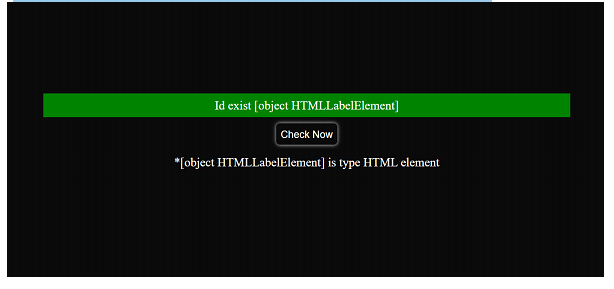
当 id=“text” 存在于 HTML 元素中时
在给定的输出中,[HTMLLabelElement] 表示我们已处理检查的“id”在“HTML 的标签元素”中可用。
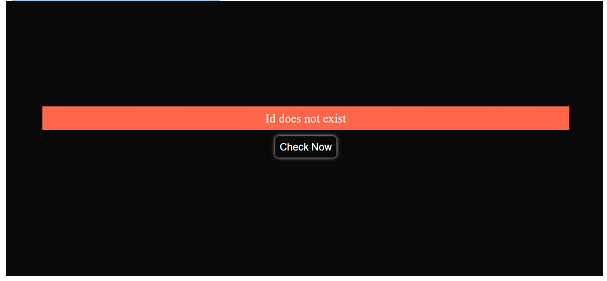
当 id=“tex” 不存在于任何 HTML 元素中时
<label id="text"></label>
结论
`document.getElementById()` 的返回类型为“Object HTMLTagElement”,如果在 DOM 搜索树中找不到 id,则返回 null。“id” 的每个 HTML 元素都是唯一的,因此很容易在 HTML 标签中搜索特定的 id。如果“id”不是唯一的,则 `getElementById()` 方法将返回在 HTML 主体中找到的第一个元素。`document.getElementById()` 与 `addEventListener` 连接,我们可以直接从 JavaScript 执行点击事件,而无需在 `

4K+ 浏览量
