
 数据结构
数据结构 网络
网络 关系型数据库管理系统
 操作系统
操作系统 Java
Java MS Excel
 iOS
iOS HTML
HTML CSS
CSS Android
 Python
 C 语言编程
 C++
C++ C#
C# MongoDB
 MySQL
MySQL Javascript
 PHP
PHP 物理学
物理学 化学
化学 生物学
生物学 数学
数学 英语
英语 经济学
经济学 心理学
心理学 社会学
社会学 时尚研究
时尚研究 法律研究
法律研究如何使用 WebDriver 检查元素是否可见?
我们可以使用 Selenium webdriver 检查元素是否存在。有多种方法可以检查它。我们将使用同步中的显式等待概念来验证元素的可见性。
让我们考虑以下网页元素并检查它是否在页面上可见。有一个名为 visibilityOfElementLocated 的条件,我们将使用它来检查元素的可见性。它将在指定的时间内等待元素,之后它将抛出异常。
我们需要 **import org.openqa.selenium.support.ui.ExpectedConditions** 和 **import org.openqa.selenium.support.ui.WebDriverWait** 来整合预期条件和 WebDriverWait 类。我们将引入一个 try/catch 块。在 catch 块中,如果元素在页面上不可见,我们将抛出 **NoSuchElementException**。
我们还可以借助 isDisplayed() 方法确认元素是否可见。此方法返回 true 或 false 值。如果元素不可见,则该方法返回 false 值。
让我们检查以下元素是否可见 -

示例
import org.openqa.selenium.By;
import org.openqa.selenium.WebDriver;
import org.openqa.selenium.WebElement;
import org.openqa.selenium.chrome.ChromeDriver;
import java.util.concurrent.TimeUnit;
import org.openqa.selenium.support.ui.WebDriverWait;
import org.openqa.selenium.support.ui.ExpectedConditions;
import java.util.NoSuchElementException;

public class CheckVisibile{
   public static void main(String[] args) {
      System.setProperty("webdriver.chrome.driver","C:\Users\ghs6kor\Desktop\Java\chromedriver.exe");
      WebDriver driver = new ChromeDriver();
      driver.manage().timeouts().implicitlyWait(8, TimeUnit.SECONDS);
      driver.get("https://tutorialspoint.com/index.htm");
      try {
         // identify element
         WebElement t = driver.findElement(By.cssSelector("h4"));
         // Explicit wait condition for visibility of element
         WebDriverWait w = new WebDriverWait(driver, 5);
         w.until(ExpectedConditions .visibilityOfElementLocated(By.cssSelector("h4")));
         System.out.println("Element is visible");
      }
      catch(NoSuchElementException n) {
         System.out.println("Element is invisible");
      }
      driver.close();
   }
}
示例
import org.openqa.selenium.By;
import org.openqa.selenium.WebDriver;
import org.openqa.selenium.WebElement;
import org.openqa.selenium.chrome.ChromeDriver;
import java.util.concurrent.TimeUnit;

public class CheckIsDisplayed{
   public static void main(String[] args) {
         System.setProperty("webdriver.chrome.driver","C:\Users\ghs6kor\Desktop\Java\chromedriver.exe");
         WebDriver driver = new ChromeDriver();
         driver.manage().timeouts().implicitlyWait(5, TimeUnit.SECONDS);
         driver.get("https://tutorialspoint.com/index.htm");
         // identify element
         try {
            WebElement t = driver.findElement(By.cssSelector("h4"));
            // check visibility with isDisplayed()
            if (t.isDisplayed()){
               System.out.println("Element is visible");
         }
         catch(Exception n)   {
            System.out.println("Element is invisible");
         }
      driver.close();
   }
}
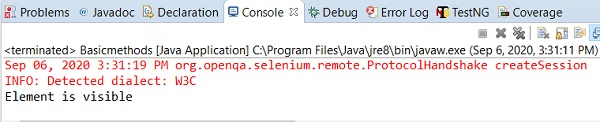
输出

更新于: 2020年9月18日
7K+ 次浏览

广告