
 数据结构
数据结构 网络
网络 RDBMS
RDBMS 操作系统
操作系统 Java
Java MS Excel
 iOS
iOS HTML
HTML CSS
CSS Android
 Python
 C 编程
C 编程 C++
C++ C#
C# MongoDB
 MySQL
MySQL Javascript
 PHP
PHP 物理
物理 化学
化学 生物
生物 数学
数学 英语
英语 经济
经济 心理学
心理学 社会研究
社会研究 时尚研究
时尚研究 法律研究
法律研究如何检查元素是否存在于 C# Selenium 驱动程序中?
我们可以使用 C# 中的 Selenium Web 驱动程序检查元素是否存在。这可以通过 **FindElements** 方法的帮助来确定。它返回一个列表,其中包含与作为该方法参数传递的位置匹配的元素。
如果没有匹配的元素,则会获取一个空列表。如果我们使用 **FindElement** 方法而不是 FindElements,则如果没有匹配的元素,将抛出 **NoSuchElementException**。
对于实现,我们将使用 NUnit 框架。
示例
using NUnit.Framework;
using OpenQA.Selenium;
using OpenQA.Selenium.Chrome;
using OpenQA.Selenium.Firefox;
using System;
using System.Collections.Generic;
namespace NUnitTestProject1{
   public class Tests{
      String u
      = "https://tutorialspoint.com/about/about_careers.htm";
      IWebDriver d;
      [SetUp]
      public void Setup(){
         //creating object of FirefoxDriver
         d = new FirefoxDriver();
      }
      [Test]
      public void Test1(){
         //launching URL
         d.Navigate()
         .GoToUrl(u);
         //identify elements and store it in list
         List<IWebElement> e = new List<IWebElement>();
         e.AddRange(d.FindElements
         (By.XPath("//*[text()='Terms of Use']")));
         //checking element count in list
         if (e.Count > 0){
            Console.WriteLine("Element is Present");
         } else {
            Console.WriteLine("Element is not Present");
         }
      }
      [TearDown]
      public void close_Browser(){
         d.Quit();
      }
   }
}
输出
单击 **运行所有测试** −

单击 **打开此结果的其他输出** 链接 −
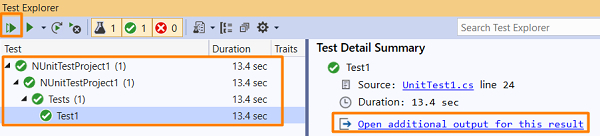
我们应该得到 **测试结果** 和 **标准输出**。


更新于:2021-01-30
5 千+ 浏览量

广告