
 数据结构
数据结构 网络
网络 关系数据库管理系统 (RDBMS)
 操作系统
操作系统 Java
Java MS Excel
 iOS
iOS HTML
HTML CSS
CSS Android
 Python
 C语言编程
C语言编程 C++
C++ C#
C# MongoDB
 MySQL
MySQL Javascript
 PHP
PHP 物理学
物理学 化学
化学 生物学
生物学 数学
数学 英语
英语 经济学
经济学 心理学
心理学 社会学
社会学 时尚研究
时尚研究 法律研究
法律研究如何在Android中以编程方式检查应用程序是否已安装?
介绍
在Android应用程序中,我们经常需要借助其他应用程序来完成某些功能。例如,如果我们想从我们的应用程序中打开谷歌地图来显示两个位置之间的路线。在打开谷歌地图之前,我们首先需要检查用户设备上是否安装了谷歌地图应用程序。本文将介绍如何检查应用程序是否已安装。
实现
我们将创建一个简单的应用程序,其中包含一个用于显示应用程序标题的TextView和一个用于检查是否安装了谷歌地图的按钮。
步骤 1:在Android Studio中创建一个新项目
打开Android Studio,点击“新建项目”来创建一个新的Android Studio项目。

点击“新建项目”后,您将看到如下界面。

在这个界面中,选择“Empty Activity”,然后点击“下一步”。点击下一步后,您将看到如下界面。
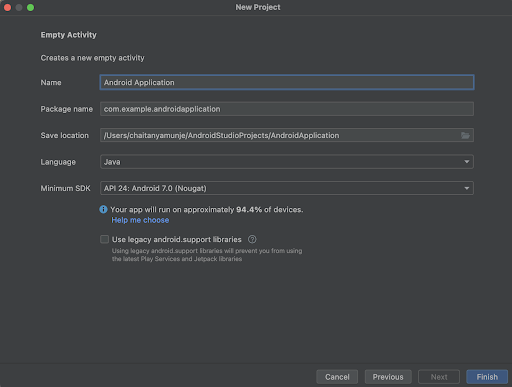
在这个界面中,只需指定项目名称即可。包名将自动生成。
注意 - 请确保选择Java作为编程语言。
指定所有详细信息后,点击“完成”以创建一个新的Android Studio项目。
项目创建完成后,您将看到两个打开的文件:activity_main.xml和MainActivity.java。
步骤 2:处理activity_main.xml
打开activity_main.xml文件。(如果此文件不可见,请在左侧面板中导航到app>res>layout>activity_main.xml)。打开文件后,添加以下代码。代码中添加了注释以便于理解。
<?xml version="1.0" encoding="utf-8"?>
<RelativeLayout xmlns:android="http://schemas.android.com/apk/res/android"
   xmlns:app="http://schemas.android.com/apk/res-auto"
   xmlns:tools="http://schemas.android.com/tools"
   android:layout_width="match_parent"
   android:layout_height="match_parent"
   tools:context=".MainActivity">
   <!-- creating a text view on below line-->
   <TextView
       android:id="@+id/idTVHeading"
       android:layout_width="match_parent"
       android:layout_height="wrap_content"
       android:layout_centerInParent="true"
       android:layout_marginStart="20dp"
       android:layout_marginTop="20dp"
       android:layout_marginEnd="20dp"
       android:layout_marginBottom="20dp"
       android:padding="4dp"
       android:text="Check weather Application is installed or not in Android"
       android:textAlignment="center"
       android:textColor="@color/black"
       android:textSize="20sp"
       android:textStyle="bold" />
   <!-- creating a button on below line -->
   <Button
       android:id="@+id/idBtnCheckMaps"
       android:layout_width="match_parent"
       android:layout_height="wrap_content"
       android:layout_below="@id/idTVHeading"
       android:layout_margin="15dp"
       android:text="Check Google Maps Application"
       android:textAllCaps="false" />
</RelativeLayout>
说明:在上面的代码中,我们创建了一个RelativeLayout作为根布局。在这个布局中,我们创建了一个TextView来显示应用程序标题,还有一个按钮用于检查设备上是否安装了谷歌地图。
步骤 3:处理MainActivity.java文件
打开MainActivity.java文件。(如果此文件不可见,请在左侧面板中导航到app>java>您的包名>MainActivity.java)。打开文件后,添加以下代码。代码中添加了注释以便于理解。
package com.example.java_test_application;

import android.content.Context;
import android.content.pm.PackageManager;
import android.os.Bundle;
import android.view.View;
import android.widget.Button;
import android.widget.Toast;

import androidx.annotation.NonNull;
import androidx.appcompat.app.AppCompatActivity;

public class MainActivity extends AppCompatActivity {

   // creating variables on below line for text view.
   private Button checkAppBtn;
   @Override
   protected void onCreate(Bundle savedInstanceState) {
       super.onCreate(savedInstanceState);
       setContentView(R.layout.activity_main);
       // initializing variables on below line.
       checkAppBtn = findViewById(R.id.idBtnCheckMaps);

       // on below line adding click listener
       checkAppBtn.setOnClickListener(new View.OnClickListener() {
           @Override
           public void onClick(View v) {
               // on below line we are checking if the google maps is installed or not by specifying package name of google maps.
               if (checkInstallation(MainActivity.this, "com.google.android.apps.maps")) {
                   // on below line displaying a toast message if maps is installed.
                   Toast.makeText(MainActivity.this, "Google Maps is installed on this device..", Toast.LENGTH_SHORT).show();
               } else {
                   // on below line displaying toast message if google maps is not installed.
                   Toast.makeText(MainActivity.this, "Google Maps is not installed on this device..", Toast.LENGTH_SHORT).show();
               }
           }
       });
   }
   public static boolean checkInstallation(Context context, String packageName) {
       // on below line creating a variable for package manager.
       PackageManager pm = context.getPackageManager();
       try {
           // on below line getting package info
           pm.getPackageInfo(packageName, PackageManager.GET_ACTIVITIES);
           // on below line returning true if package is installed.
           return true;
       } catch (PackageManager.NameNotFoundException e) {
           // returning false if package is not installed on device.
           return false;
       }
   }
}
说明:在上面的代码中,我们首先为按钮创建变量。然后是onCreate方法,这是每个Android应用程序的默认方法,在应用程序视图创建时调用。在这个方法中,我们设置ContentView,即activity_main.xml布局文件,以设置UI。在onCreate方法中,我们使用在activity_main.xml文件中给定的ID初始化按钮变量。然后,我们为按钮添加一个点击监听器。在点击监听器中,我们通过传递谷歌地图应用程序的包名来检查谷歌地图应用程序是否已安装。根据结果显示Toast消息。
添加上述代码后,只需点击顶部工具栏中的绿色图标即可在移动设备上运行应用程序。
注意 - 确保已连接到您的真实设备或模拟器。
输出

结论
在本教程中,我们学习了如何在Android中以编程方式检查应用程序是否已安装。

3K+ 浏览量
