
 数据结构
数据结构 网络
网络 RDBMS
RDBMS 操作系统
操作系统 Java
Java MS Excel
 iOS
iOS HTML
HTML CSS
CSS Android
 Python
 C 编程
C 编程 C++
C++ C#
C# MongoDB
 MySQL
MySQL Javascript
 PHP
PHP 物理
物理 化学
化学 生物
生物 数学
数学 英语
英语 经济学
经济学 心理学
心理学 社会研究
社会研究 时装研究
时装研究 法律研究
法律研究如何计算 PyTorch 中张量的直方图?
使用 torch.histc() 计算张量的直方图。它返回一个表示为张量的直方图。它使用四个参数:input、bins、min 和 max。它将元素排序到 min 和 max 之间的相等宽度箱中。它忽略小于 min 和大于 max 的元素。
步骤
导入所需的库。在所有以下 Python 示例中,所需的 Python 库都是 torch 和 Matplotlib。确保已经安装了它们。
创建一个张量并打印它。
计算 torch.histc(input, bins=100, min=0, max=100)。它将返回一个直方图值张量。根据需要将 bins、min 和 max 设置为适当的值。
打印上面计算的直方图。
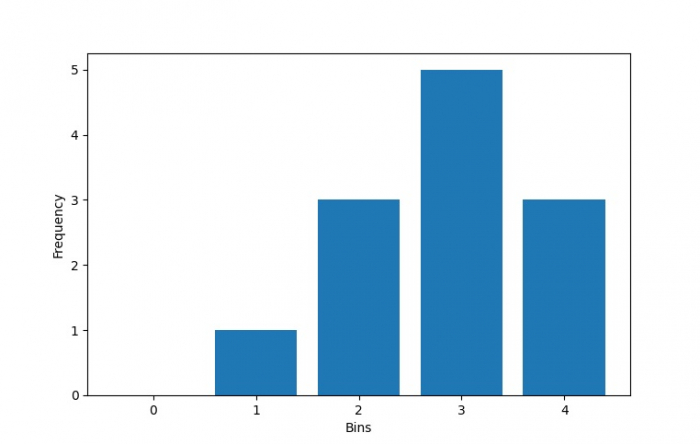
将直方图作为条形图进行可视化。
示例 1
# Python program to calculate histogram of a tensor
# import necessary libraries
import torch
import matplotlib.pyplot as plt

# Create a tensor
T = torch.Tensor([2,3,1,2,3,4,3,2,3,4,3,4])
print("Original Tensor T:\n",T)

# Calculate the histogram of the above created tensor
hist = torch.histc(T, bins = 5, min = 0, max = 4)
print("Histogram of T:\n", hist)
输出
Original Tensor T:
   tensor([2., 3., 1., 2., 3., 4., 3., 2., 3., 4., 3., 4.])
Histogram of T:
   tensor([0., 1., 3., 5., 3.])
示例 2
# Python program to calculate histogram of a tensor
# import necessary libraries
import torch
import matplotlib.pyplot as plt

# Create a tensor
T = torch.Tensor([2,3,1,2,3,4,3,2,3,4,3,4])
print("Original Tensor T:\n",T)

# Calculate the histogram of the above created tensor
hist = torch.histc(T, bins = 5, min = 0, max = 4)

# Visualize above calculated histogram as bar diagram
bins = 5
x = range(bins)
plt.bar(x, hist, align='center')
plt.xlabel('Bins')
plt.ylabel('Frequency')
plt.show()
输出
Original Tensor T:
   tensor([2., 3., 1., 2., 3., 4., 3., 2., 3., 4., 3., 4.])

更新时间:2021 年 11 月 6 日
1 千次浏览

广告