
 数据结构
数据结构 网络
网络 关系数据库管理系统 (RDBMS)
 操作系统
操作系统 Java
Java MS Excel
 iOS
iOS HTML
HTML CSS
CSS Android
 Python
 C语言编程
C语言编程 C++
C++ C#
C# MongoDB
 MySQL
MySQL Javascript
 PHP
PHP 物理学
物理学 化学
化学 生物学
生物学 数学
数学 英语
英语 经济学
经济学 心理学
心理学 社会学
社会学 服装研究
服装研究 法学研究
法学研究如何使用Selenium Webdriver连接到已打开的浏览器?
我们可以使用Selenium webdriver连接到已打开的浏览器。这可以通过使用**Capabilities**和**ChromeOptions**类来实现。Capabilities类使用**getCapabilities**方法获取浏览器功能。
这通常用于调试目的,当测试中有大量步骤并且我们不想重复相同的步骤时。首先,我们将启动浏览器并在下面的编辑框中输入一些文本。

示例
import org.openqa.selenium.WebDriver;
import org.openqa.selenium.WebElement;
import org.openqa.selenium.chrome.ChromeDriver;
import org.openqa.selenium.Capabilities;
import org.openqa.selenium.By;
import java.util.Map;
import java.util.concurrent.TimeUnit;
public class ConnectBrwSession{
   public static void main(String[] args)
   throws InterruptedException{
      System.setProperty("webdriver.chrome.driver",
         "C:\Users\ghs6kor\Desktop\Java\chromedriver.exe");
      WebDriver driver = new ChromeDriver();
      //get browser capabilities in key value pairs
      Capabilities c = driver.getCapabilities();
      Map<String, Object> m = c.asMap();
      m.forEach((key, value) −> {
         System.out.println("Key is: " + key + " Value is: " + value);
      });
      //set implicit wait
      driver.manage().timeouts().implicitlyWait(5, TimeUnit.SECONDS);
      driver.get("https://tutorialspoint.com/about/about_careers.htm");
      //identify element
      WebElement l = driver.findElement(By.id("gsc−i−id1"));
      l.sendKeys("Selenium");
   }
}
输出
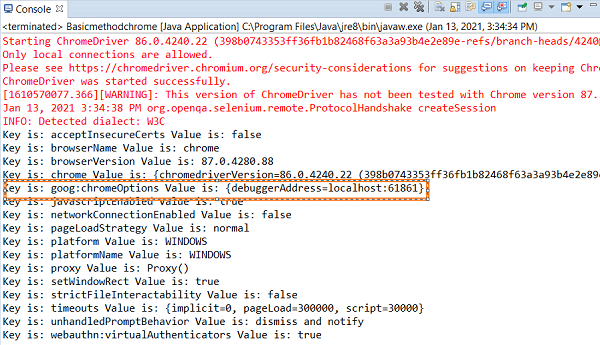
我们将记下从**控制台输出**获得的参数**{debuggerAddress=localhost:61861}**,将其添加到ChromeOptions对象中。
浏览器窗口 -
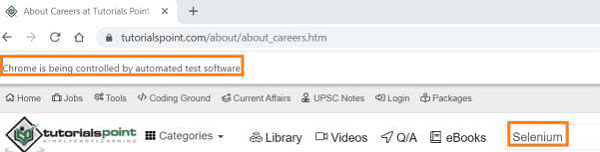
现在,让我们连接到同一个浏览器会话并对其执行一些操作。连接到现有会话时,不应使用浏览器**关闭或退出**方法。
示例
连接到同一会话所做的代码修改。
import org.openqa.selenium.WebElement;
import org.openqa.selenium.chrome.ChromeDriver;
import org.openqa.selenium.chrome.ChromeOptions;
import org.openqa.selenium.Capabilities;
import org.openqa.selenium.By;
import java.util.Map;
import org.openqa.selenium.WebDriver;
import java.util.concurrent.TimeUnit;
public class ConnectBrwSession{
   public static void main(String[] args)
   throws InterruptedException{
      System.setProperty("webdriver.chrome.driver",
         "C:\Users\ghs6kor\Desktop\Java\chromedriver.exe");
      WebDriver driver = new ChromeDriver();
      //object of ChromeOptions class
      ChromeOptions o = new ChromeOptions();
      //setting debuggerAddress value
      o.setExperimentalOption("debuggerAddress", "localhost:61861");
      //add options to browser capabilities
      Capabilities c = driver.getCapabilities(o);
      Map<String, Object> m = c.asMap();
      m.forEach((key, value) −> {
         System.out.println("Key is: " + key + " Value is: " + value);
      });
      //set implicit wait
      driver.manage().timeouts().implicitlyWait(5, TimeUnit.SECONDS);
      //identify element
      WebElement l = driver.findElement(By.id("gsc−i−id1"));
      //remove existing data in edit box
      l.clear();
      l.sendKeys("Tutorialspoint");
      String s = l.getAttribute("value");
      System.out.println("Attribute value: " + s);
   }
}
输出
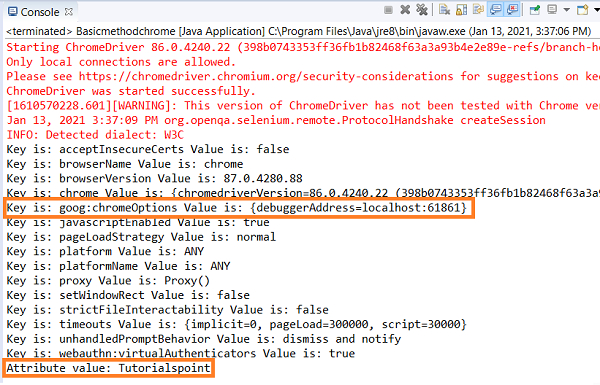
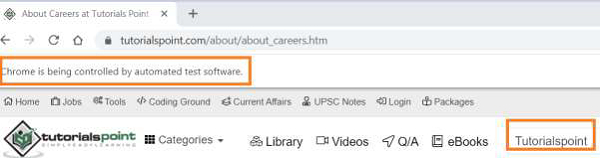
浏览器窗口

更新于:2021年1月30日
6000+ 次浏览

广告