
 数据结构
数据结构 网络
网络 RDBMS
RDBMS 操作系统
操作系统 Java
Java MS Excel
 iOS
iOS HTML
HTML CSS
CSS Android
 Python
 C 编程
C 编程 C++
C++ C#
C# MongoDB
 MySQL
MySQL Javascript
 PHP
PHP 物理学
物理学 化学
化学 生物学
生物学 数学
数学 英语
英语 经济学
经济学 心理学
心理学 社会研究
社会研究 时尚研究
时尚研究 法律研究
法律研究使用 Selenium WebDriver - 无法在 Mac 上启动 Chrome 浏览器
使用 Selenium webdriver 时,可能无法在 Mac 上启动 Chrome 浏览器。不过,可以按照以下步骤来避免 −
第 1 步 − 导航至链接:https://sites.google.com/chromium.org/driver/,然后点击与本地 Chrome 浏览器兼容的 chromedriver 版本的下载链接。
第 2 步 − 点击适用于 Mac 操作系统的 chromedriver 链接。

第 3 步 − zip 文件下载完成后,解压缩它以获取 chromedriver.exe 文件。将其保存到所需位置。
第 4 步 − 在 System.setProperty 方法中指定 chromedriver.exe 文件的路径时,我们可以只指定 chromedriver 而无需指定 chromedriver.exe。
代码实现
import org.openqa.selenium.By;
import org.openqa.selenium.WebDriver;
import org.openqa.selenium.WebElement;
import org.openqa.selenium.chrome.ChromeDriver;
import java.util.concurrent.TimeUnit;
public class FirstAssign {
   public static void main(String[] args) {
      //configure path of chromedriver.exe
      System.setProperty("webdriver.chrome.driver", "chromedriver");
      //ChromeDriver instance
      WebDriver driver = new ChromeDriver();
      //implicit wait
      driver.manage().timeouts().implicitlyWait(5, TimeUnit.SECONDS);
      //url launch
      driver.get
      ("https://tutorialspoint.com/about/about_careers.htm");
      System.out.println("Page title: "+ driver.getTitle());
      //browser quit
      driver.quit();
   }
}
输出
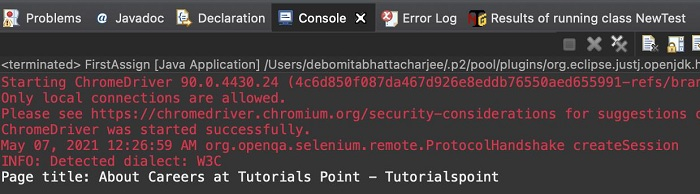

更新于: 25-6-2021
2K+ 浏览

广告