
 数据结构
数据结构 网络
网络 RDBMS
RDBMS 操作系统
操作系统 Java
Java MS Excel
 iOS
iOS HTML
HTML CSS
CSS Android
 Python
 C 编程
C 编程 C++
C++ C#
C# MongoDB
 MySQL
MySQL Javascript
 PHP
PHP 物理
物理 化学
化学 生物
生物 数学
数学 英语
英语 经济
经济 心理
心理 社会研究
社会研究 时尚
时尚 法律研究
法律研究如何通过 CSS 创建浏览器窗口示例?
要想使用 CSS 创建浏览器窗口示例,代码如下 −
示例
<!DOCTYPE html>
<html>
<head>
<meta name="viewport" content="width=device-width, initial-scale=1">
<style>
   body {
      font-family: 'Segoe UI', Tahoma, Geneva, Verdana, sans-serif;
   }
   * {
      box-sizing: border-box;
   }
   .menuBar {
      border: 3px solid #f1f1f1;
      border-top-left-radius: 4px;
      border-top-right-radius: 4px;
   }
   .menuRow {
      padding: 10px;
      background: #f1f1f1;
      border-top-left-radius: 4px;
      border-top-right-radius: 4px;
   }
   .browserField {
      float: left;
   }
   .left {
      width: 15%;
   }
   .right {
      width: 10%;
   }
   .middle {
      width: 75%;
   }
   .menuRow:after {
      content: "";
      display: table;
      clear: both;
   }
   .menuBarDots {
      margin-top: 4px;
      height: 12px;
      width: 12px;
      background-color: #bbb;
      border-radius: 50%;
      display: inline-block;
   }
   input[type=text] {
      width: 100%;
      border-radius: 3px;
      border: none;
      background-color: white;
      margin-top: -8px;
      height: 25px;
      color: #666;
      padding: 5px;
   }
   .menuDots {
      width: 5px;
      height: 5px;
      background-color: #aaa;
      margin: 3px 0;
      display: block;
      border-radius: 50%;
   }
   .content {
      padding: 10px;
   }
</style>
</head>
<body>
<div class="menuBar">
<div class="menuRow">
<div class="browserField left">
<span class="menuBarDots" style="background:#ED594A;"></span>
<span class="menuBarDots" style="background:#FDD800;"></span>
<span class="menuBarDots" style="background:#5AC05A;"></span>
</div>
<div class="browserField middle">
<input type="text" value="https://demo.com/">
</div>
<div class="browserField right">
<div style="float:right">
<span class="menuDots"></span>
<span class="menuDots"></span>
<span class="menuDots"></span>
</div>
</div>
</div>
<div class="content">
<h1>Sample Text</h1>
<h2>Welcome to our website</h2>
</div>
</div>
</body>
</html>
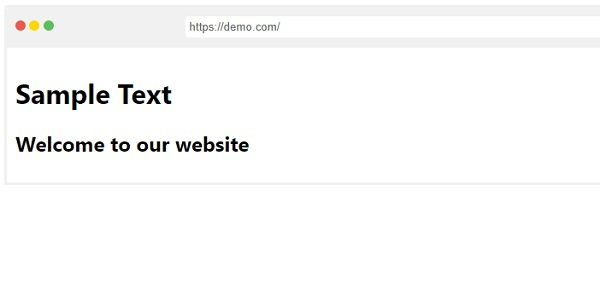
输出
以上代码会产生以下输出 −

更新于: 08-May-2020
221 次浏览

广告