
 数据结构
数据结构 网络
网络 RDBMS
RDBMS 操作系统
操作系统 Java
Java MS Excel
 iOS
iOS HTML
HTML CSS
CSS 安卓
安卓 Python
 C 编程
C 编程 C++
C++ C#
C# MongoDB
 MySQL
MySQL Javascript
 PHP
PHP 物理学
物理学 化学
化学 生物学
生物学 数学
数学 英语
英语 经济学
经济学 心理学
心理学 社会学
社会学 时尚研究
时尚研究 法律研究
法律研究如何使用 Swift 在 iOS 应用程序中创建一个自定义对话框?
要在 Swift 中创建一个对话框,我们将使用 UIAlertController,它是 UIKit 中的一个重要部分。我们使用一个 iOS 应用程序和一个示例项目来完成此操作。
首先,我们将创建一个空项目,然后在其默认视图控制器中,执行以下操作。
我们将创建一个 UIAlertController 对象。
let alert = UIAlertController.init(title: title, message: description, preferredStyle: .alert)
我们将创建一个操作
let okAction = UIAlertAction.init(title: "Ok", style: .default) { _ in
   print("You tapped ok")
   //custom action here.
}
我们将操作添加到警报并显示它
alert.addAction(okAction)
self.present(alert, animated: true, completion: nil)
现在,我们将此内容转换为函数 −
func createAlert(withTitle title:String,andDescription description: String) {
   let alert = UIAlertController.init(title: title, message: description, preferredStyle: .alert)
   let okAction = UIAlertAction.init(title: "Ok", style: .default) {
       _ in print("You tapped ok")
      //custom action here.
   }
   alert.addAction(okAction)
   self.present(alert, animated: true, completion: nil)
}
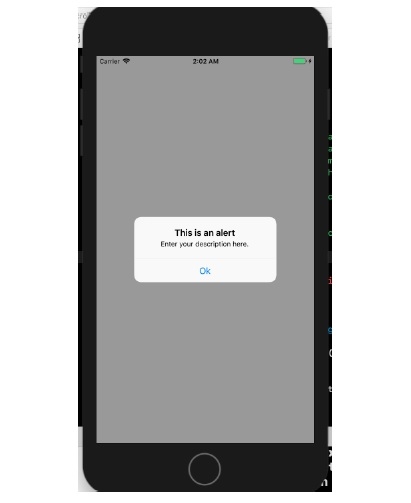
我们现在将在 viewWillLayoutSubviews 方法中调用此函数,当我们在设备上运行此函数时,它的外观如下。
override func viewWillLayoutSubviews() {
   self.createAlert(withTitle: "This is an alert", andDescription: "Enter your description here.")
}
结果如下所示。

更新时间: 2020 年 6 月 30 日
737 次浏览

广告