
 数据结构
数据结构 网络
网络 关系数据库管理系统(RDBMS)
 操作系统
操作系统 Java
Java MS Excel
 iOS
iOS HTML
HTML CSS
CSS Android
 Python
 C语言编程
C语言编程 C++
C++ C#
C# MongoDB
 MySQL
MySQL Javascript
 PHP
PHP 物理学
物理学 化学
化学 生物学
生物学 数学
数学 英语
英语 经济学
经济学 心理学
心理学 社会学
社会学 服装学
服装学 法学
法学如何使用HTML、CSS和JavaScript创建损益计算器?
在这篇文章中,我们将使用JavaScript创建一个计算器。我们将使用基本的数学公式来计算损益。我们将以百分比和实际值的形式返回结果。
为了计算损益,我们需要两样东西:**成本价 (CP)** 和 **售价 (SP)**。
计算损益的公式:
利润:SP – CP
利润百分比:利润/CP * 100
亏损:SP – CP
亏损百分比:亏损/CP * 100
示例 1
在下面的示例中,我们创建了一个计算器,它将根据成本价和售价计算损益百分比。
点击“计算”按钮,它将调用一个函数,该函数将获取 CP 和 SP 输入,然后计算损益。
#文件名: index.html
<!DOCTYPE html>
<html lang="en">
<head>
   <title>Profit and Loss Calculator</title>
</head>
<body>
   <div class="plcalculate">
      <h1 style="color: green;">
         Welcome To Tutorials Point
      </h1>
      <h3>Profit and Loss Calculator</h3>
      <p>Enter the Cost Price(CP) :
         <input class="cp" type="number" />
      </p>
      <p>Enter the Selling Price(SP) :
         <input class="sp" type="number" />
      </p>
      <button onclick="Calculate()">Calculate Profit/Loss</button>
      <p>
         <h2 class="loss"></h2>
         <h2 class="lossPercentage"></h2>
         <h2 class="nothing"></h2>
      </p>
   </div>
   <script>
      function Calculate(){
         const CP= document.querySelector(".cp").value;
         const SP= document.querySelector(".sp").value;
         const profitLoss=document.querySelector(".loss");
         const percentage=document.querySelector(".lossPercentage");
         const nothing=document.querySelector(".nothing");
         profitLoss.innerHTML="";
         percentage.innerHTML="";
         nothing.innerHTML="";
         const diff=SP - CP;
         if(diff>0){
            const profit_percent= ((diff/CP)*100).toFixed(2);
            profitLoss.innerHTML="It is a Profit of: INR "+ diff;
            percentage.innerHTML="Total Profit Percentage : "+
            profit_percent;
         } else if(diff<0){
            const loss_percent= ((Math.abs(diff)/CP)*100).toFixed(2);
            profitLoss.innerHTML="It is a Loss of: INR "+ Math.abs(diff);
            percentage.innerHTML="Total Loss Percentage : "+ loss_percent;
         } else if(diff==0){
            nothing.innerHTML="No Profit No Loss";
      }
   }
   </script>
</body>
</html>
输出
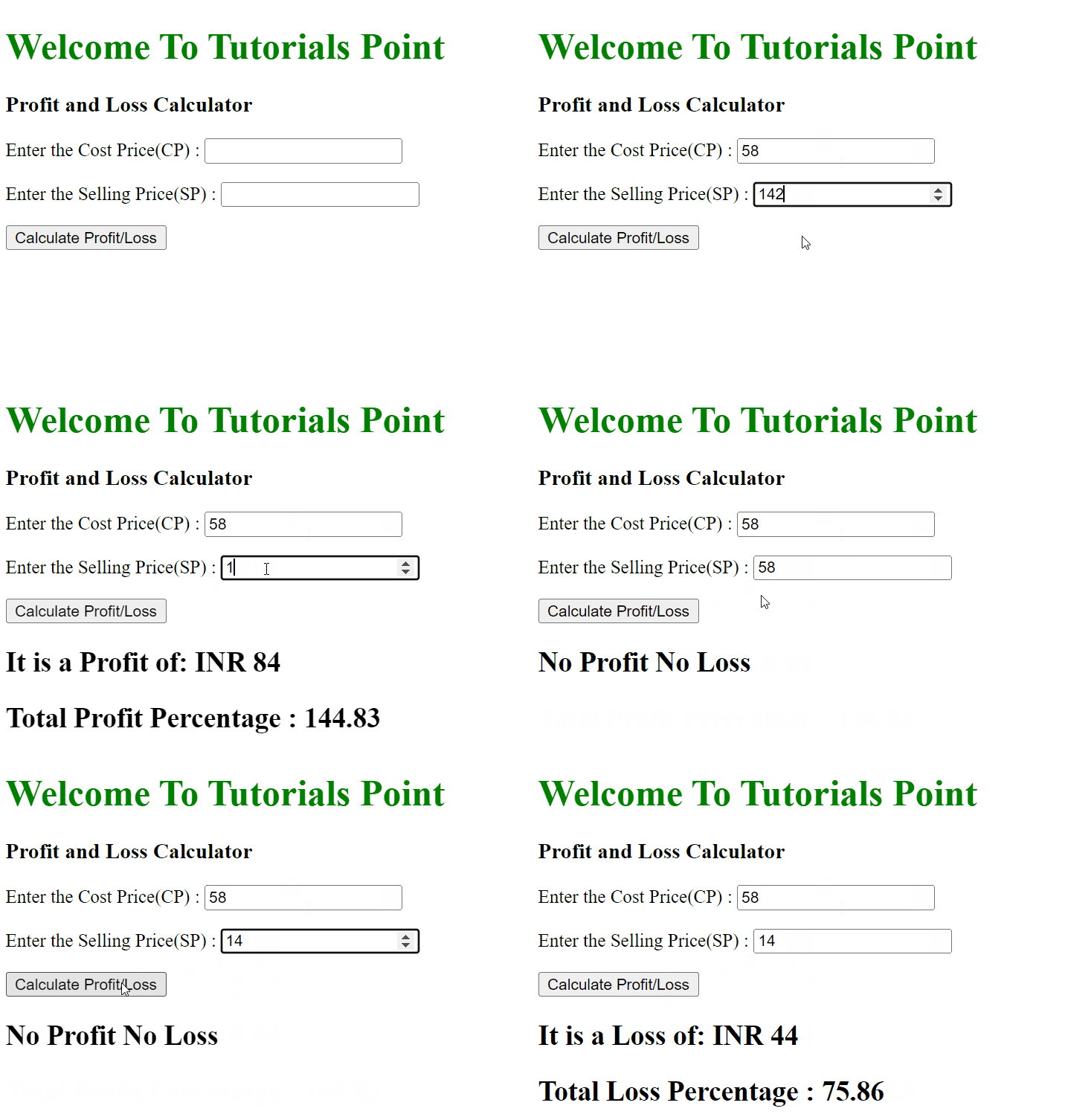
成功执行上述程序后,它将生成一个损益计算器。您可以输入成本价和售价。输入成本价和售价后,您可以点击“计算损益”按钮来计算利润或亏损。

更新于:2022年4月21日
2K+ 次查看

广告