
 数据结构
数据结构 网络
网络 RDBMS
RDBMS 操作系统
操作系统 Java
Java MS Excel
 iOS
iOS HTML
HTML CSS
CSS Android
 Python
 C 编程
C 编程 C++
C++ C#
C# MongoDB
 MySQL
MySQL Javascript
 PHP
PHP 物理
物理 化学
化学 生物
生物 数学
数学 英语
英语 经济学
经济学 心理学
心理学 社会学
社会学 时尚学
时尚学 法律
法律如何使用 JavaFX 创建工具提示?
工具提示是一个 UI 元素,使用该元素可以提供有关 GUI 应用程序中元素的其他信息。
每当您将鼠标指针悬停在应用程序中的元素(例如按钮、标签等)上时,工具提示都会显示一条有关该元素的提示。
在 JavaFX 中,工具提示由 javafx.scene.control.Tooltip 类表示,您可以通过实例化它来创建一个工具提示。
创建工具提示
此类别的文本属性保存了当前工具提示要显示的文本或提示。您可以使用 setText() 方法将值设置到此属性。或者,您只需将要显示的文本(字符串)作为参数传递给 toolTip 类别的构造函数。
创建工具提示后,可以使用 install() 方法将它安装在任何节点上。(参数-节点和工具提示)。
您还可以在 javafx.scene.control.Control 类别(所有用户界面控制器的父类别)的 setTooltip() 方法中设置一个工具提示。
示例
import javafx.application.Application;
import javafx.geometry.Insets;
import javafx.scene.Scene;
import javafx.scene.control.Label;
import javafx.scene.control.PasswordField;
import javafx.scene.control.TextField;
import javafx.scene.control.Tooltip;
import javafx.scene.layout.HBox;
import javafx.scene.paint.Color;
import javafx.stage.Stage;
public class TooltipExample extends Application {
   public void start(Stage stage) {
      //Creating labels
      Label label1 = new Label("User Name: ");
      Label label2 = new Label("Password: ");
      //Creating text and password fields
      TextField textField = new TextField();
      PasswordField pwdField = new PasswordField();
      //Creating tool tip for text field
      Tooltip toolTipTxt = new Tooltip("Enter your user name");
      //Setting the tool tip to the text field
      Tooltip.install(textField, toolTipTxt);
      //Creating tool tip for password field
      Tooltip toolTipPwd = new Tooltip("Enter your password");
      //Setting the tool tip to the text field
      Tooltip.install(pwdField, toolTipPwd);
      //Adding labels for nodes
      HBox box = new HBox(5);
      box.setPadding(new Insets(25, 5 , 5, 50));
      box.getChildren().addAll(label1, textField, label2, pwdField);
      //Setting the stage
      Scene scene = new Scene(box, 595, 150, Color.BEIGE);
      stage.setTitle("Tooltip Example");
      stage.setScene(scene);
      stage.show();
   }
   public static void main(String args[]){
      launch(args);
   }
}
输出
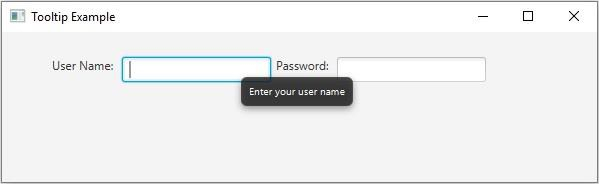

更新日期: 2020 年 3 月 18 日
531 次浏览

广告