
 数据结构
数据结构 网络
网络 RDBMS
RDBMS 操作系统
操作系统 Java
Java MS Excel
 iOS
iOS HTML
HTML CSS
CSS Android
 Python
 C 编程
C 编程 C++
C++ C#
C# MongoDB
 MySQL
MySQL Javascript
 PHP
PHP 物理学
物理学 化学
化学 生物学
生物学 数学
数学 英语
英语 经济学
经济学 心理学
心理学 社会科学
社会科学 时尚研究
时尚研究 法律研究
法律研究如何使用 JavaFX 创建一个组合框?
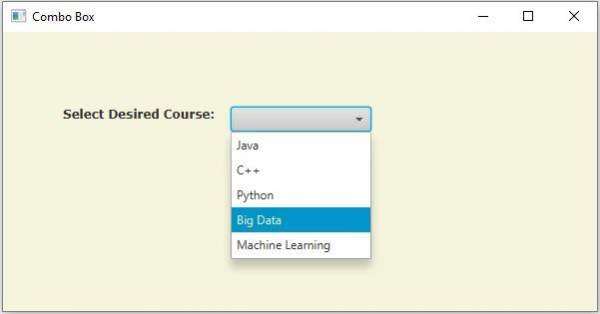
组合框类似于选择框,它包含多个项目并允许你选择其中一个。它可以通过在下拉列表中添加滚动条来形成。你可以通过实例化javafx.scene.control.ComboBox 类来创建一个组合框。
示例
以下示例演示了组合框的创建。
import javafx.application.Application;
import javafx.collections.ObservableList;
import javafx.geometry.Insets;
import javafx.scene.Group;
import javafx.scene.Scene;
import javafx.scene.control.ComboBox;
import javafx.scene.control.Label;
import javafx.stage.Stage;
import javafx.scene.layout.HBox;
import javafx.scene.paint.Color;
import javafx.scene.text.Font;
import javafx.scene.text.FontPosture;
import javafx.scene.text.FontWeight;
public class ComboBoxExample extends Application {
   public void start(Stage stage) {
      //Setting the label
      Label label = new Label("Select Desired Course:");
      Font font = Font.font("verdana", FontWeight.BOLD, FontPosture.REGULAR, 12);
      label.setFont(font);
      //Creating a combo box
      ComboBox<String> combo = new ComboBox<String>();
      //Setting the prompt text of the combo box
      combo.setPromptText("Select Course");
      //Getting the observable list of the combo box
      ObservableList<String> list = combo.getItems();
      //Adding items to the combo box
      list.add("Java");
      list.add("C++");
      list.add("Python");
      list.add("Big Data");
      list.add("Machine Learning");
      HBox hbox = new HBox(15);
      //Setting the space between the nodes of a HBox pane
      hbox.setPadding(new Insets(75, 150, 50, 60));
      hbox.getChildren().addAll(label, combo);
      //Creating a scene object
      Scene scene = new Scene(new Group(hbox), 595, 280, Color.BEIGE);
      stage.setTitle("Combo Box");
      stage.setScene(scene);
      stage.show();
   }
   public static void main(String args[]){
      launch(args);
   }
}
输出

更新于:2020 年 5 月 18 日
2K+ 次浏览

广告