
 数据结构
数据结构 网络
网络 RDBMS
RDBMS 操作系统
操作系统 Java
Java MS Excel
 iOS
iOS HTML
HTML CSS
CSS Android
 Python
 C 编程
C 编程 C++
C++ C#
C# MongoDB
 MySQL
MySQL Javascript
 PHP
PHP 物理
物理 化学
化学 生物
生物 数学
数学 英语
英语 经济
经济 心理学
心理学 社会科学
社会科学 时尚文化
时尚文化 法律教程
法律教程如何在 JavaFX 中创建上下文菜单?
菜单是向用户显示的一组选项或命令,通常菜单包括执行某种操作的项目。菜单的内容称为菜单项。
上下文菜单
上下文菜单是一个弹出的,在与应用程序中的 UI 元素进行交互时出现的菜单。最好的例子是当您用鼠标单击鼠标右键时系统中出现的菜单。您可以通过实例化**javafx.scene.control.ContextMenu**类来创建一个上下文菜单。
就像菜单一样,创建上下文菜单后,需要向其中添加 MenuItem。您可以使用**setContextMenu()**方法将 ContextMenu 设置到 javafx.scene.control 类中的任何对象。
这些内容菜单通常会在您“单击鼠标右键”附加的控件时显示。
示例
import java.io.FileNotFoundException;
import javafx.application.Application;
import javafx.geometry.Insets;
import javafx.scene.Group;
import javafx.scene.Scene;
import javafx.scene.control.Button;
import javafx.scene.control.ContextMenu;
import javafx.scene.control.MenuItem;
import javafx.scene.control.TextField;
import javafx.scene.layout.HBox;
import javafx.scene.paint.Color;
import javafx.stage.Stage;
public class ContextMenuExample extends Application {
   public void start(Stage stage) throws FileNotFoundException {
      //Creating the image view
      Button button = new Button("Hello");
      TextField textField = new TextField();
      //Creating a context menu
      ContextMenu contextMenu = new ContextMenu();
      //Creating the menu Items for the context menu
      MenuItem item1 = new MenuItem("option1");
      MenuItem item2 = new MenuItem("option2");
      contextMenu.getItems().addAll(item1, item2);
      //Adding the context menu to the button and the text field
      textField.setContextMenu(contextMenu);
      button.setContextMenu(contextMenu);
      HBox layout = new HBox(20);
      layout.setPadding(new Insets(15, 15, 15, 100));
      layout.getChildren().addAll(textField, button);
      //Setting the stage
      Scene scene = new Scene(new Group(layout), 595, 150, Color.BEIGE);
      stage.setTitle("CustomMenuItem");
      stage.setScene(scene);
      stage.show();
   }
   public static void main(String args[]){
      launch(args);
   }
}
输出
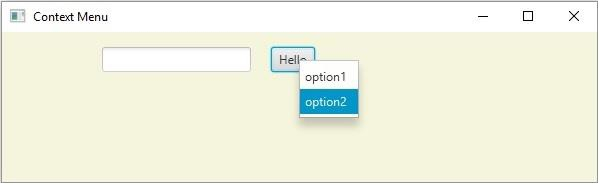

更新于:2020 年 5 月 20 日
1000+ 查看次数

广告