
 数据结构
数据结构 网络
网络 RDBMS
RDBMS 操作系统
操作系统 Java
Java MS Excel
 iOS
iOS HTML
HTML CSS
CSS Android
 Python
 C 编程
C 编程 C++
C++ C#
C# MongoDB
 MySQL
MySQL Javascript
 PHP
PHP 物理
物理 化学
化学 生物
生物 数学
数学 英语
英语 经济学
经济学 心理学
心理学 社会学
社会学 时尚课程
时尚课程 法律课程
法律课程如何使 JTabbedPane 容器中的滚动选项卡生效
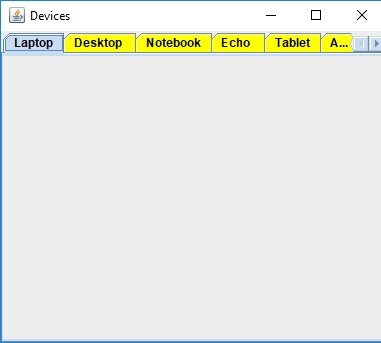
要使 JTabbedPane 容器中的滚动选项卡生效,请使用 setTabLayoutPolicy() 方法−
tabbedPane.setTabLayoutPolicy(JTabbedPane.SCROLL_TAB_LAYOUT);
我们在上面已将常量设为 SCROLL_TAB_LAYOUT,这是因为我们希望当所有选项卡不能在一行内全部显示时能显示滚动条。
以下是如何在 JTabbedPane 容器中启用滚动选项卡的示例−
示例
package my;
import javax.swing.*;
import java.awt.*;
public class SwingDemo {
   public static void main(String args[]) {
      JFrame frame = new JFrame("Devices");
      JTabbedPane tabbedPane = new JTabbedPane();
      JTextArea text = new JTextArea(100,100);
      JPanel panel1, panel2, panel3, panel4, panel5, panel6, panel7, panel8;
      panel1 = new JPanel();
      panel2 = new JPanel();
      panel2.add(text);
      panel3 = new JPanel();
      panel4 = new JPanel();
      panel5 = new JPanel();
      panel6 = new JPanel();
      panel7 = new JPanel();
      panel8 = new JPanel();
      tabbedPane.setBackground(Color.yellow);
      tabbedPane.setForeground(Color.black);
      tabbedPane.addTab("Laptop", panel1);
      tabbedPane.addTab("Desktop ", panel2);
      tabbedPane.addTab("Notebook", panel3);
      tabbedPane.addTab("Echo ", panel4);
      tabbedPane.addTab("Tablet", panel5);
      tabbedPane.addTab("Alexa ", panel6);
      tabbedPane.addTab("Notebook", panel7);
      tabbedPane.addTab("iPad", panel8);
      tabbedPane.setTabLayoutPolicy(JTabbedPane.SCROLL_TAB_LAYOUT);
      frame.add(tabbedPane);
      frame.setDefaultCloseOperation(JFrame.EXIT_ON_CLOSE);
      frame.setSize(400,350);
      frame.setVisible(true);
   }
}
输出
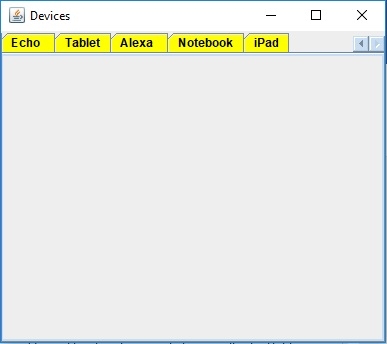
滚动并按向右导航键后,将显示以下内容。现在可以看见其余的选项卡−

更新时间: 30-Jul-2019
250 次浏览

广告