
 数据结构
数据结构 网络
网络 关系数据库管理系统
 操作系统
操作系统 Java
Java MS Excel
 iOS
iOS HTML
HTML CSS
CSS Android
 Python
 C 编程
C 编程 C++
C++ C#
C# MongoDB
 MySQL
MySQL Javascript
 PHP
PHP 物理学
物理学 化学
化学 生物学
生物学 数学
数学 英语
英语 经济学
经济学 心理学
心理学 社会学
社会学 服装设计
服装设计 法律学
法律学如何在 Selenium 中使用“CSS 选择器”查找元素?
我们可以使用 Selenium webdriver 通过 css 定位器查找元素。要使用 css 识别元素,表达式应为 tagname[attribute='value']。
我们还可以专门使用 id 属性来创建 css 表达式。
使用 id 时,css 表达式的格式应为 tagname#<id>。例如,input#txt [此处 input 是标签名,txt 是 id 属性的值]。
使用 class 时,css 表达式的格式应为 tagname.<class>。例如,input.cls-txt [此处 input 是标签名,cls-txt 是 class 属性的值]。
如果父元素有 n 个子元素,并且我们想识别第 n 个子元素,则 css 表达式应包含 nth-of –type(n)。
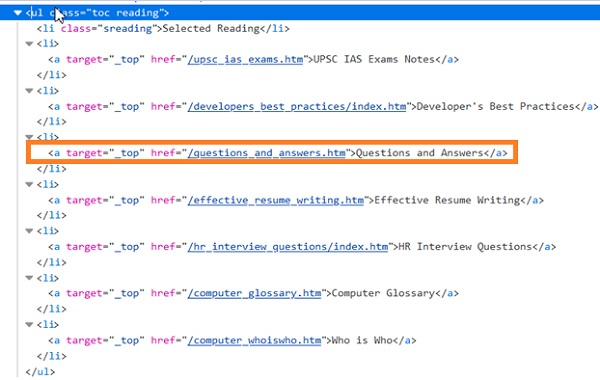
在上面的代码中,如果我们想识别 ul[问答] 的第四个 li 子元素,则 css 表达式应为 ul.reading li:nth-of-type(4)。同样,要识别最后一个子元素,css 表达式应为 ul.reading li:last-child。
对于值动态变化的属性,我们可以使用 ^= 来定位其值以特定文本开头的元素。例如,input[name^='qa'] [此处 input 是标签名,name 属性的值以 qa 开头]。
对于值动态变化的属性,我们可以使用 $= 来定位其值以特定文本结尾的元素。例如,input[class$='txt'] [此处 input 是标签名,class 属性的值以 txt 结尾]。
对于值动态变化的属性,我们可以使用 *= 来定位其值包含特定子文本的元素。例如,input[name*='nam'] [此处 input 是标签名,name 属性的值包含子文本 nam]。
示例
import org.openqa.selenium.By;
import org.openqa.selenium.WebDriver;
import org.openqa.selenium.WebElement;
import org.openqa.selenium.firefox.FirefoxDriver;
import java.util.concurrent.TimeUnit;
public class LocatorCss{
   public static void main(String[] args) {
      System.setProperty("webdriver.gecko.driver",
         "C:\Users\ghs6kor\Desktop\Java\geckodriver.exe");
      WebDriver driver = new FirefoxDriver();
      //implicit wait
      driver.manage().timeouts().implicitlyWait(5, TimeUnit.SECONDS);
      //URL launch
      driver.get("https://www.linkedin.com/");
      //identify element with css
      WebElement n = driver.
      findElement(By.cssSelector("input[id='session_key']"));
      n.sendKeys("Java");
      String str = n.getAttribute("value");
      System.out.println("Attribute value: " + str);
      driver.quit();
   }
}
输出


5K+ 浏览量
