
 数据结构
数据结构 网络
网络 关系数据库管理系统 (RDBMS)
 操作系统
操作系统 Java
Java MS Excel
 iOS
iOS HTML
HTML CSS
CSS Android
 Python
 C 编程
C 编程 C++
C++ C#
C# MongoDB
 MySQL
MySQL Javascript
 PHP
PHP 物理学
物理学 化学
化学 生物学
生物学 数学
数学 英语
英语 经济学
经济学 心理学
心理学 社会学
社会学 服装学
服装学 法学
法学如何在 JavaScript 中获取对象的属性描述符?
在本文中,我们将探讨属性描述符以及如何从对象中获取这些值。 **Object.getOwnPropertyDescriptor** 方法返回一个对象,该对象描述给定对象中的特定属性。JavaScript 对象可以通过多种方式创建,这些方式可以通过使用对象的属性描述符来调用。
语法
Object.getOwnPropertyDescriptor(obj, prop
属性描述符接受两个参数作为输入,如下所述:
**obj** - 对象指的是需要描述其属性的对象名称。
**prop** - 它定义了需要返回值的对象的特定属性。
如果属性存在,此方法将返回对象的属性。
示例 1
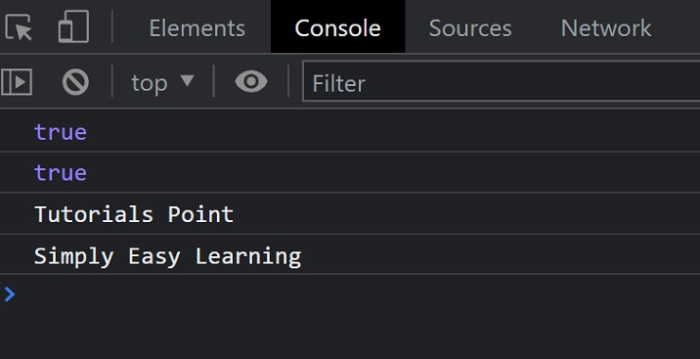
在下面的示例中,我们创建了一个简单的对象。创建对象后,我们使用属性描述符查找属性的指定值。我们将使用 Object.getOwnPropertyDescriptor() 方法来返回与属性相关的属性和值。
# index.html
<!DOCTYPE html>
<html lang="en">
<head>
   <title>Property Descriptors</title>
</head>
<body>
   <h1 style="color: green;">
      Welcome To Tutorials Point
   </h1>
   <script>
      // Object
      const Obj = {
         property1: "Tutorials Point",
         property2: "Simply Easy Learning"
      };
      const descriptor1 = Object.getOwnPropertyDescriptor(Obj, 'property1');
      const descriptor2 = Object.getOwnPropertyDescriptor(Obj, 'property2');
      console.log(descriptor1.configurable);
      // expected output: true

      console.log(descriptor1.enumerable);
      // expected output: true

      console.log(descriptor1.value);
      // expected output: Tutorials Point

      console.log(descriptor2.value);
      // expected output: Simply Easy Learning
   </script>
</body>
</html>
输出
成功执行后,结果可以在控制台中找到。
描述符
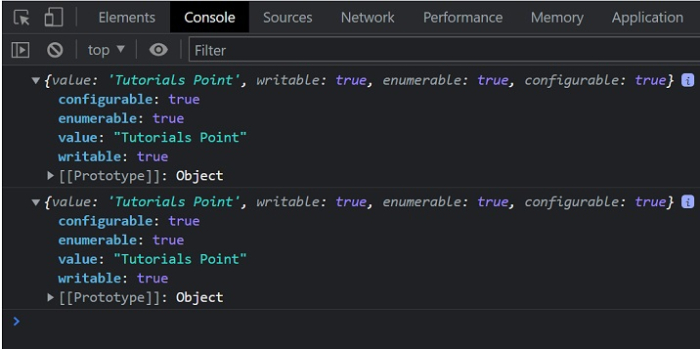
对象的属性描述符使用以下属性来定义每个属性。
**value** - 这将返回与属性关联的值。
**writable** - 这指示属性是否已更改。如果属性已更改,它将返回 true。
**enumerable** - 如果属性在相应对象的枚举期间可见,则返回 true。
**configurable** - 这指示是否可以配置属性。
示例 2
# index.html
<!DOCTYPE html>
<html lang="en">
<head>
   <title>Property Descriptors</title>
</head>
<body>
   <h1 style="color: green;">
      Welcome To Tutorials Point
   </h1>
   <script>
      // Object
      const Obj = {
         property1: "Tutorials Point",
         property2: "Simply Easy Learning"
      };
      const descriptor1 = Object.getOwnPropertyDescriptor(Obj, 'property1');
      const descriptor2 = Object.getOwnPropertyDescriptor(Obj, 'property2');
      console.log(descriptor1);
      console.log(descriptor1);
   </script>
</body>
</html>
输出

更新于:2022年4月26日
173 次浏览

广告