
 数据结构
数据结构 网络
网络 关系数据库管理系统
 操作系统
操作系统 Java
Java MS Excel
 iOS
iOS HTML
HTML CSS
CSS Android
 Python
 C 编程
C 编程 C++
C++ C#
C# MongoDB
 MySQL
MySQL Javascript
 PHP
PHP 物理
物理 化学
化学 生物
生物 数学
数学 英语
英语 经济学
经济学 心理学
心理学 社会科学
社会科学 时装学
时装学 法律研究
法律研究如何通过 Firefox logging 在 Selenium 中获取
执行测试完成后,将生成日志记录,因为 Firefox 登录使用 geckodriver 登录。Firefox 生成的日志记录可通过设置某些参数禁用。
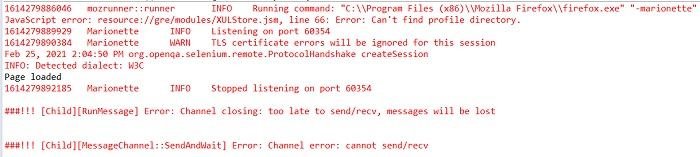
我们可以停止这些日志记录在控制台中记录并将其捕获到一个不同的文件中。借助 System.setProperty 方法可以实现这一目标。在上图中,我们可以在控制 台中看到生成的 geckodriver 日志记录。
语法
System.setProperty(FirefoxDriver.SystemProperty.DRIVER_USE_MARIONETTE, "true"); // turning off logs

System.setProperty(FirefoxDriver.SystemProperty.BROWSER_LOGFILE, "<path of file>"); // record logs in another file
示例
import org.openqa.selenium.By;
import org.openqa.selenium.WebDriver;
import org.openqa.selenium.WebElement;
import org.openqa.selenium.firefox.FirefoxDriver;
import java.util.concurrent.TimeUnit;
public class LogsDisable{
   public static void main(String[] args) {
      System.setProperty("webdriver.gecko.driver",
      "C:\Users\ghs6kor\Desktop\Java\geckodriver.exe");

      //logging disable
      System.setProperty
      (FirefoxDriver.SystemProperty.DRIVER_USE_MARIONETTE, "true");

      //record log in Firefoxlogs.txt file
      System.setProperty(FirefoxDriver.SystemProperty.BROWSER_LOGFILE,
      "C:\Users\ghs6kor\Desktop\DebomitaJava\Logs\Firefoxlogs.txt");
      WebDriver driver = new FirefoxDriver();

      //implicit wait
      driver.manage().timeouts().implicitlyWait(5, TimeUnit.SECONDS);

      //URL launch
      driver.get("https://tutorialspoint.com/about/about_careers.htm");
      System.out.println("Page loaded");
      driver.quit();
   }
}
输出

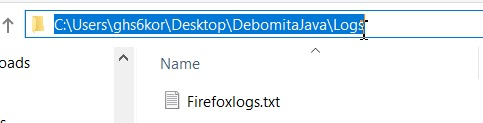
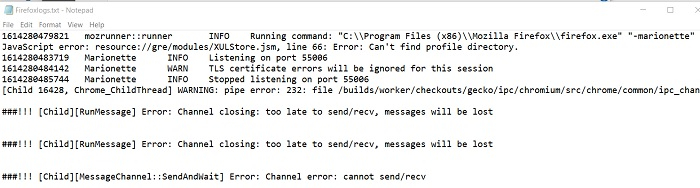
Firefoxlogs.txt 文件
文件内容

更新于: 2022 年 2 月 8 日
2K+ 次浏览

广告