
 数据结构
数据结构 网络
网络 关系数据库管理系统 (RDBMS)
 操作系统
操作系统 Java
Java MS Excel
 iOS
iOS HTML
HTML CSS
CSS Android
 Python
 C语言编程
C语言编程 C++
C++ C#
C# MongoDB
 MySQL
MySQL Javascript
 PHP
PHP 物理学
物理学 化学
化学 生物学
生物学 数学
数学 英语
英语 经济学
经济学 心理学
心理学 社会学
社会学 服装设计
服装设计 法学
法学如何使用C++在OpenCV中获取特定像素的值?
要读取特定像素的值,我们可以使用“at”方法或“直接访问”方法。在这里,我们将学习这两种方法。
让我们从“at”方法开始。下面的程序读取RGB图像中(10, 29)位置的像素值。
示例
#include<iostream>
#include<opencv2/highgui/highgui.hpp>
using namespace std;
using namespace cv;
int main() {
   Mat image;//taking an image matrix//
   image = imread("sky.jpg");//loading an image//
   int x = image.at<Vec3b>(10, 29)[0];//getting the pixel values//
   int y = image.at<Vec3b>(10, 29)[1];//getting the pixel values//
   int z = image.at<Vec3b>(10, 29)[2];//getting the pixel values//
   cout << "Value of blue channel:" << x << endl;//showing the pixel values//
   cout << "Value of green channel:" << x << endl;//showing the pixel values//
   cout << "Value of red channel:" << x << endl;//showing the pixel values//
   system("pause");//pause the system to visualize the result//
   return 0;
}
输出
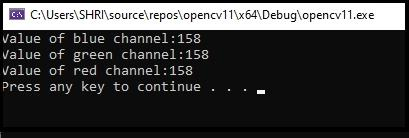
程序的结果将显示在控制台窗口中。在这里,我们使用下面的三行代码获取三个不同通道的像素值。
int x = image.at<Vec3b>(10, 29)[0];
int y = image.at<Vec3b>(10, 29)[1];
int z = image.at<Vec3b>(10, 29)[2];
第一行读取第一个通道(蓝色)中(10, 29)位置的像素值,并将值存储在变量'x'中。第二行和第三行分别存储第2个和第3个通道的值。现在让我们学习如何使用“直接访问”方法读取像素值。
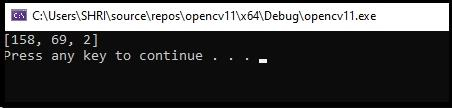
下面的程序直接读取(10, 29)位置的像素值:
示例
#include<iostream>
#include<opencv2/highgui/highgui.hpp>
using namespace std;
using namespace cv;
int main() {
   Mat_<Vec3b>image;//taking an image matrix//
   image = imread("sky.jpg");//loading an image//
   Vec3b x = image(10, 29);//getting the pixel values//
   cout << x << endl;//showing the pixel values//
   system("pause");//pause the system to visualize the result//
   return 0;
}
输出

更新于:2021年3月10日
5K+ 浏览量

广告