
 数据结构
数据结构 网络
网络 关系数据库管理系统(RDBMS)
 操作系统
操作系统 Java
Java MS Excel
 iOS
iOS HTML
HTML CSS
CSS Android
 Python
 C语言编程
C语言编程 C++
C++ C#
C# MongoDB
 MySQL
MySQL Javascript
 PHP
PHP 物理学
物理学 化学
化学 生物学
生物学 数学
数学 英语
英语 经济学
经济学 心理学
心理学 社会学
社会学 服装学
服装学 法学
法学如何在Ubuntu/Linux Mint中通过PPA安装Angry IP Scanner
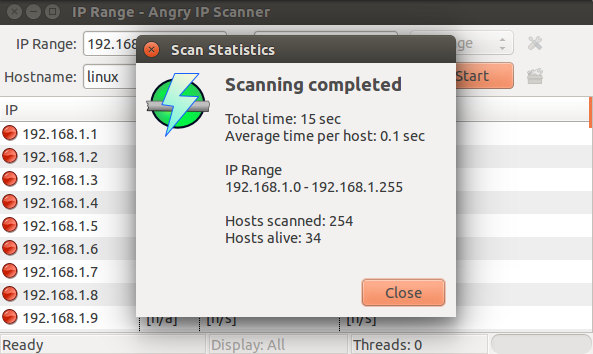
Angry IP Scanner是一款开源的跨平台网络扫描器。它速度很快,使用简单,可以扫描IP地址和端口。TCP/IP(Angry IP)网络扫描器允许用户通过用户友好的界面轻松扫描任何您选择的IP地址范围。一旦Angry IP Scanner检测到活动的IP地址,它就会解析MAC地址、主机名和端口。收集到的数据信息可以保存为TXT、CSV、XML或IP-Port列表文件。本文介绍了“如何在Linux中安装和使用IP扫描器”。
安装Angry IP Scanner
要在Ubuntu/Linux Mint中安装Angry IP Scanner,请打开终端并使用以下命令访问PPA仓库:
$ sudo add-apt-repository ppa:upubuntu-com/network
示例输出应如下所示:
More info: https://launchpad.net/~upubuntu-com/+archive/ubuntu/network
Press [ENTER] to continue or ctrl-c to cancel adding it

gpg: keyring `/tmp/tmpaj4fxqym/secring.gpg' created
gpg: keyring `/tmp/tmpaj4fxqym/pubring.gpg' created
gpg: requesting key E06E6293 from hkp server keyserver.ubuntu.com

gpg: /tmp/tmpaj4fxqym/trustdb.gpg: trustdb created
gpg: key E06E6293: public key "Launchpad PPA for upubuntu.com" imported
gpg: Total number processed: 1
gpg:             imported: 1 (RSA: 1)
OK
现在,使用以下命令更新Linux软件包索引:
$ sudo apt-get update
示例输出应如下所示:
Ign http://dl.google.com stable InRelease
Get:1 http://dl.google.com stable Release.gpg [181 B]
Get:2 http://dl.google.com stable Release [782 B]
Get:3 http://security.ubuntu.com trusty-security InRelease [65.9 kB]
Ign http://extras.ubuntu.com trusty InRelease
Ign http://in.archive.ubuntu.com trusty InRelease
Hit http://ppa.launchpad.net trusty InRelease
Get:4 http://dl.google.com stable/main amd64 Packages [1,215 B]
Get:5 http://extras.ubuntu.com trusty Release.gpg [72 B]
Get:6 http://in.archive.ubuntu.com trusty-updates InRelease [65.9 kB]
Hit http://ppa.launchpad.net trusty InRelease
Hit http://extras.ubuntu.com trusty Release
Get:7 http://ppa.launchpad.net trusty InRelease [20.9 kB]
Hit http://extras.ubuntu.com trusty/main Sources
Get:8 http://security.ubuntu.com trusty-security/main Sources [108 kB]
Hit http://extras.ubuntu.com trusty/main amd64 Packages
Get:9 http://in.archive.ubuntu.com trusty-backports InRelease [65.9 kB]
Ign http://ppa.launchpad.net trusty InRelease
Hit http://extras.ubuntu.com trusty/main i386 Packages
Get:10 http://security.ubuntu.com trusty-security/restricted Sources [4,035 B]
Ign http://ppa.launchpad.net trusty InRelease
Get:11 http://security.ubuntu.com trusty-security/universe Sources [34.0 kB]
Hit http://in.archive.ubuntu.com trusty Release.gpg
Hit http://ppa.launchpad.net trusty/main amd64 Packages
Get:12 http://security.ubuntu.com trusty-security/multiverse Sources [2,750 B]
Get:13 http://in.archive.ubuntu.com trusty-updates/main Sources [264 kB]
Hit http://ppa.launchpad.net trusty/main i386 Packages
Get:14 http://security.ubuntu.com trusty-security/main amd64 Packages [444 kB]
Hit http://ppa.launchpad.net trusty/main Translation-en
Hit http://ppa.launchpad.net trusty/main amd64 Packages
Hit http://ppa.launchpad.net trusty/main i386 Packages
Hit http://ppa.launchpad.net trusty/main Translation-en
Get:15 http://ppa.launchpad.net trusty/main amd64 Packages [27.9 kB]
.............................................................
要安装IP扫描器,请使用以下命令:
$ sudo apt-get install ipscan
示例输出应如下所示:
Reading package lists... Done
Building dependency tree
Reading state information... Done
The following packages were automatically installed and are no longer required:
   libapache2-mod-php5 linux-headers-4.2.0-27 linux-headers-4.2.0-27-generic
   linux-image-4.2.0-27-generic linux-image-extra-4.2.0-27-generic
   linux-signed-image-4.2.0-27-generic
Use 'apt-get autoremove' to remove them.
The following extra packages will be installed:
   ca-certificates-java fonts-dejavu-extra java-common libatk-wrapper-java
   libatk-wrapper-java-jni libgconf2-4 libsctp1 lksctp-tools openjdk-7-jre
   openjdk-7-jre-headless tzdata-java
Suggested packages:
   default-jre equivs icedtea-7-plugin icedtea-7-jre-jamvm sun-java6-fonts
   fonts-ipafont-gothic fonts-ipafont-mincho ttf-wqy-microhei ttf-wqy-zenhei
   ttf-telugu-fonts ttf-oriya-fonts ttf-kannada-fonts ttf-bengali-fonts
The following NEW packages will be installed:
   ca-certificates-java fonts-dejavu-extra ipscan java-common
..........................................................
要打开IP扫描器,请使用以下命令:
$ ipscan
输出应如下所示:
要移除angryIP扫描器,请使用以下命令:
$ sudo apt-get remove ipscan
示例输出应如下所示:
Reading package lists... Done
Building dependency tree
Reading state information... Done
The following packages were automatically installed and are no longer required:
   libapache2-mod-php5 linux-headers-4.2.0-27 linux-headers-4.2.0-27-generic
   linux-image-4.2.0-27-generic linux-image-extra-4.2.0-27-generic
   linux-signed-image-4.2.0-27-generic
Use 'apt-get autoremove' to remove them.
The following packages will be REMOVED:
   ipscan
0 upgraded, 0 newly installed, 1 to remove and 12 not upgraded.
After this operation, 3,358 kB disk space will be freed.
Do you want to continue? [Y/n] y
(Reading database ... 251656 files and directories currently installed.)
Removing ipscan (3.3.3) ...
Processing triggers for gnome-menus (3.10.1-0ubuntu2) ...
Processing triggers for desktop-file-utils (0.22-1ubuntu1) ...
Processing triggers for bamfdaemon (0.5.1+14.04.20140409-0ubuntu1) ...
...............................................
现在移除已添加的PPA,使用以下命令:
$ sudo add-apt-repository --remove ppa:upubuntu-com/network
示例输出应如下所示:
More info: https://launchpad.net/~upubuntu-com/+archive/ubuntu/network
Press [ENTER] to continue or ctrl-c to cancel removing it
现在使用以下命令更新Linux软件包索引:
$ sudo apt-get update
示例输出应如下所示:
Ign http://dl.google.com stable InRelease
Hit http://dl.google.com stable Release.gpg
Hit http://dl.google.com stable Release
Hit http://dl.google.com stable/main amd64 Packages
Ign http://extras.ubuntu.com trusty InRelease
Hit http://ppa.launchpad.net trusty InRelease
Get:1 http://security.ubuntu.com trusty-security InRelease [65.9 kB]
Hit http://extras.ubuntu.com trusty Release.gpg
Ign http://in.archive.ubuntu.com trusty InRelease
Hit http://ppa.launchpad.net trusty InRelease
Hit http://extras.ubuntu.com trusty Release
Hit http://ppa.launchpad.net trusty InRelease
Get:2 http://in.archive.ubuntu.com trusty-updates InRelease [65.9 kB]
Hit http://extras.ubuntu.com trusty/main Sources
Ign http://ppa.launchpad.net trusty InRelease
Get:3 http://security.ubuntu.com trusty-security/main Sources [108 kB]
Hit http://extras.ubuntu.com trusty/main amd64 Packages
Hit http://ppa.launchpad.net trusty/main amd64 Packages
Hit http://extras.ubuntu.com trusty/main i386 Packages
Hit http://ppa.launchpad.net trusty/main i386 Packages
Get:4 http://security.ubuntu.com trusty-security/restricted Sources [4,035 B]
Hit http://ppa.launchpad.net trusty/main Translation-en
Get:5 http://security.ubuntu.com trusty-security/universe Sources [34.0 kB]
Hit http://ppa.launchpad.net trusty/main amd64 Packages
Get:6 http://in.archive.ubuntu.com trusty-backports InRelease [65.9 kB]
.............................
恭喜!现在您已经学会了“如何在Ubuntu/Linux Mint中通过PPA安装Angry IP Scanner”。我们将在下一篇文章中学习更多关于这些命令的知识。继续关注!

更新于:2020年1月20日
6000+ 次浏览

广告