
 数据结构
数据结构 网络
网络 RDBMS
RDBMS 操作系统
操作系统 Java
Java MS Excel
 iOS
iOS HTML
HTML CSS
CSS Android
 Python
 C 编程语言
 C++
C++ C#
C# MongoDB
 MySQL
MySQL Javascript
 PHP
PHP 物理
物理 化学
化学 生物
生物 数学
数学 英语
英语 经济学
经济学 心理学
心理学 社会学
社会学 时尚
时尚 法律
法律如何重置 Python Tkinter 按钮的背景色?
Tkinter 按钮对于处理应用程序中的事件非常有用。我们可以使用预定义的属性来配置按钮属性,例如文本样式、字体系列、背景色、文本颜色和文本大小。
我们可以通过定义回调函数来重置背景色和其他属性。
示例
#Import the tkinter library
from tkinter import *
from tkinter import ttk
#Create an instance of tkinter frame
win= Tk()
#Define the geometry of the function
win.geometry("750x250")
#Define a function to change the properties of button
def change_color():
   btn.configure(bg="OrangeRed3", fg= "white")
#Create a Label
Label(win, text= "Click the Button to reset the Color of the Button", font= ('Georgia 16 italic')).pack(pady=30)
#Create a button to close the window
btn = Button(win, text ="RESET", command=change_color, font=('Georgia 11'))
btn.pack(side=TOP, ipady=5, ipadx=20)
win.mainloop()
输出
运行以上代码会显示一个包含按钮和文本的窗口。
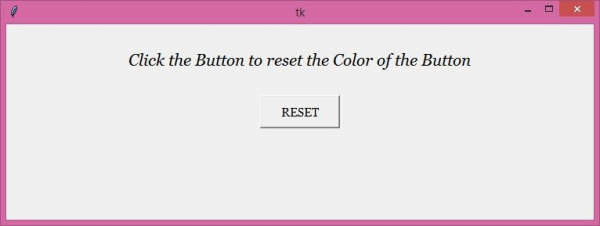
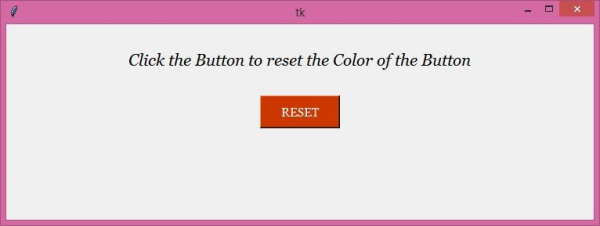
现在,点击“重置”按钮来更改按钮的背景色以及前景颜色。

更新于: 2021 年 4 月 22 日
2K+ 浏览

广告