
 数据结构
数据结构 网络
网络 关系数据库管理系统 (RDBMS)
 操作系统
操作系统 Java
Java MS Excel
 iOS
iOS HTML
HTML CSS
CSS Android
 Python
 C语言编程
C语言编程 C++
C++ C#
C# MongoDB
 MySQL
MySQL Javascript
 PHP
PHP 物理学
物理学 化学
化学 生物学
生物学 数学
数学 英语
英语 经济学
经济学 心理学
心理学 社会研究
社会研究 时尚研究
时尚研究 法律研究
法律研究如何在JDBC中从后往前读取ResultSet的内容?
ResultSet 对象
某些SQL查询(特别是SELECT)返回表格数据,在JDBC中,**java.sql.ResultSet**接口的对象保存着由执行查询数据库语句的的方法(通常是Statement接口的executeQuery()方法)返回的表格数据。
ResultSet 游标/指针
ResultSet对象有一个游标/指针,指向当前行。最初,此游标位于第一行之前。
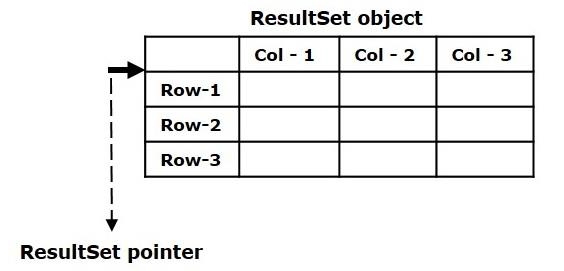
ResultSet 有两种类型:只向前和双向。默认情况下,通过**executeQuery()**方法获得的ResultSet类型为只向前。使用此类型,您只能向前移动游标。
双向ResultSet
双向ResultSet对象是指其游标可以向前和向后移动的对象。Connection接口的**createStatement()**方法有一个变体,它接受两个整数值,分别表示结果集类型和并发类型。
Statement createStatement(int resultSetType, int resultSetConcurrency)
要创建双向结果集,您需要将类型设置为ResultSet.TYPE_SCROLL_SENSITIVE 或 ResultSet.TYPE_SCROLL_INSENSITIVE,以及并发性,传递给此方法。
//Creating a Statement object
Statement stmt = con.createStatement(ResultSet.TYPE_SCROLL_SENSITIVE, ResultSet.CONCUR_UPDATABLE);
然后,如果您使用此语句调用**executeQuery()**方法,它将返回一个双向的ResultSet对象。
从最后打印内容
ResultSet接口的**previous()**方法将此ResultSet对象的指针从当前位置移动到前一行。
此方法返回一个布尔值,指定ResultSet对象是否包含更多行。
如果在其当前位置之前没有行,则此方法返回false,否则返回true。
ResultSet接口的Getter方法(getInt()、getString()等)接受列索引并返回当前行中指定列的值。
使用这些方法,您可以从前往后检索ResultSet对象的内容。
while(rs.previous()) {
   System.out.print("Brand: "+rs.getString("Mobile_Brand")+", ");
   System.out.print("Sale: "+rs.getString("Unit_Sale"));
   System.out.println("");
}
让我们使用如下所示的CREATE语句在MySQL数据库中创建一个名为**mobile_sales**的表:
CREATE TABLE mobile_sales (
   mobile_brand VARCHAR(255),
   unit_sale INT
);
现在,我们将使用INSERT语句在**mobile_sales**表中插入11条记录:
insert into mobile_sales values('Iphone', 3000);
insert into mobile_sales values('Samsung', 4000);
insert into mobile_sales values('Nokia', 5000);
insert into mobile_sales values('Vivo', 1500);
insert into mobile_sales values('Oppo', 900);
insert into mobile_sales values('MI', 6400);
insert into mobile_sales values('MotoG', 4360);
insert into mobile_sales values('Lenovo', 4100);
insert into mobile_sales values('RedMI', 4000);
insert into mobile_sales values('MotoG', 4360);
insert into mobile_sales values('OnePlus', 6334);
以下示例建立与数据库的连接,并从后往前检索**mobile_sales**表的内容。
示例
import java.sql.Connection;
import java.sql.DriverManager;
import java.sql.ResultSet;
import java.sql.Statement;
public class BidirectionalResultSet {
   public static void main(String args[]) throws Exception {
      //Registering the Driver
      DriverManager.registerDriver(new com.mysql.jdbc.Driver());
      //Getting the connection
      String mysqlUrl = "jdbc:mysql:///TestDB";
      Connection con = DriverManager.getConnection(mysqlUrl, "root", "password");
      System.out.println("Connection established......");
      //Creating a Statement object
      Statement stmt = con.createStatement(ResultSet.TYPE_SCROLL_SENSITIVE, ResultSet.CONCUR_UPDATABLE);
      //Retrieving the data
      ResultSet rs = stmt.executeQuery("select * from mobile_sales");
      //Moving the cursor to the end of the ResultSet
      rs.afterLast();
      System.out.println("Contents of the table");
      while(rs.previous()) {
         System.out.print("Brand: "+rs.getString("Mobile_Brand")+", ");
         System.out.print("Sale: "+rs.getString("Unit_Sale"));
         System.out.println("");
      }
   }
}
输出
Connection established......
Contents of the table
Brand: Vivo, Sale: 1500
Brand: Nokia, Sale: 5000
Brand: Samsung, Sale: 4000
Brand: IPhone, Sale: 3000

569 次浏览
