
 数据结构
数据结构 网络
网络 RDBMS
RDBMS 操作系统
操作系统 Java
Java MS Excel
 iOS
iOS HTML
HTML CSS
CSS 安卓
安卓 Python
 C 编程
C 编程 C++
C++ C#
C# MongoDB
 MySQL
MySQL Javascript
 PHP
PHP 物理学
物理学 化学
化学 生物
生物 数学
数学 英语
英语 经济学
经济学 心理学
心理学 社会学
社会学 时尚研究
时尚研究 法律研究
法律研究如何基于 RegEx 在 JavaScript 中返回所有匹配字符串?
在本文中,我们将探索正则表达式 (RegEx)的基础知识,以及如何在 JavaScript 中使用此正则表达式与其他字符串进行比较。我们将学习如何使用正则表达式识别类似的字符串,然后返回这些字符串。我们可以使用 string.search() 方法来匹配给定字符串中的正则表达式。
语法
let index = string.search(expression)
参数
字符串 - 这是在同表达式比较时需要搜索的字符串。
表达式 - 这是将用于验证原始字符串的正则表达式。
示例 1
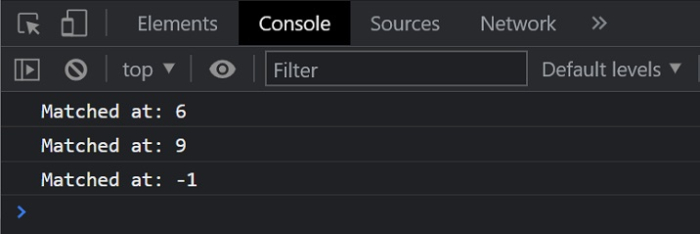
在下面的示例中,我们将使用在函数中呈现的子字符串/正则表达式比较一个字符串。此方法仅返回匹配该表达式的元素,否则将不返回该字符串。
# index.html
<!DOCTYPE html>
<html>
<head>
   <title>
      Comparing Strings
   </title>
</head>
<body>
   <h2 style="color:green">
      Welcome To Tutorials Point
   </h2>
</body>
   <script>
      // Taking a String input.
      var string = "Start Learning new technologies now.";

      // Defining a regular expression
      var regexp1 = /Lea/;
      var regexp2 = /rn/;
      var regexp3 = /abc/;
      console.log("Matched at:"+string.search(regexp1));

      // Expected Output: 6
      console.log("Matched at:"+string.search(regexp2));

      // Expected Output: 9
      console.log("Matched at:"+string.search(regexp3));

      // Expected Output: -1
   </script>
</html>
输出
示例 2
# index.html
<!DOCTYPE html>
<html>
<head>
   <title>
      Comparing Strings
   </title>
</head>
<body>
   <h2 style="color:green">
      Welcome To Tutorials Point
   </h2>
</body>
   <script>
      // Taking input an array of strings.
      let input = [
         "Tutorials Point has 40 million readers every month",
         "Start your journey with Tutorials Point",
         "It started in 2006",
         "Start Learning",
         "Tutorials Point started in 2006"
      ];
      let i;
      // Defining the regular expression
      let regexp = /Tutorials/;
      let result = [];
      for (i = 0; i < input.length; i++) {
         if (input[i].search(regexp) != -1) {
            result.push(input[i])
         }
      }
      console.log("Resultant array is:"+result)
   </script>
</html>
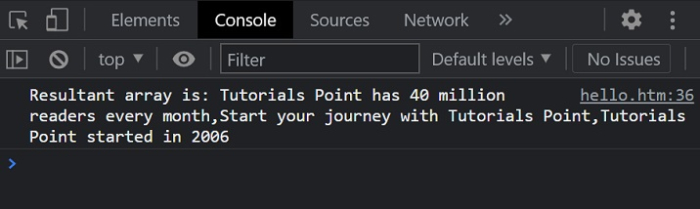
输出

更新于: 26-Apr-2022
382 次浏览

广告