
 数据结构
数据结构 网络
网络 关系数据库管理系统
 操作系统
操作系统 Java
Java MS Excel
 iOS
iOS HTML
HTML CSS
CSS Android
 Python
 C 编程
C 编程 C++
C++ C#
C# MongoDB
 MySQL
MySQL Javascript
 PHP
PHP 物理
物理 化学
化学 生物
生物 数学
数学 英语
英语 经济学
经济学 心理学
心理学 政治经济史
政治经济史 时装学
时装学 法律研究
法律研究如何利用 Java 中的 Selenium 滚动浏览网页?
我们可以利用 Java 中的 Selenium 滚动浏览网页。Selenium 无法直接处理滚动。它借助 Javascript 执行程序执行滚动操作直到某一个元素。
首先,我们必须找到需要滚动的目标元素。接下来,我们使用 Javascript 执行程序来运行 Javascript 命令。executeScript 方法用于在 Selenium 中运行 Javascript 命令。我们使用 Javascript 中的 scrollIntoView 方法,并将 true 作为方法的一个参数。
语法 −
WebElement elm = driver.findElement(By.name("name"));
((JavascriptExecutor) driver)
.executeScript("arguments[0].scrollIntoView(true);", elm);
示例
import org.openqa.selenium.By;
import org.openqa.selenium.WebDriver;
import org.openqa.selenium.WebElement;
import org.openqa.selenium.firefox.FirefoxDriver;
import java.util.concurrent.TimeUnit;
import org.openqa.selenium.JavascriptExecutor;
public class ScrollAction{
   public static void main(String[] args) {
      System.setProperty("webdriver.gecko.driver", "C:\Users\ghs6kor\Desktop\Java\geckodriver.exe");
      WebDriver driver = new FirefoxDriver();
      //implicit wait
      driver.manage().timeouts().implicitlyWait(4, TimeUnit.SECONDS);
      //launch application
      driver.get
      ("https://tutorialspoint.com/about/about_careers.htm ");
      // identify element
      WebElement n=driver.findElement(By.xpath("//*[text()='Contact']"));
      // Javascript executor
      ((JavascriptExecutor)driver)
      .executeScript("arguments[0].scrollIntoView(true);", n);
   }
}
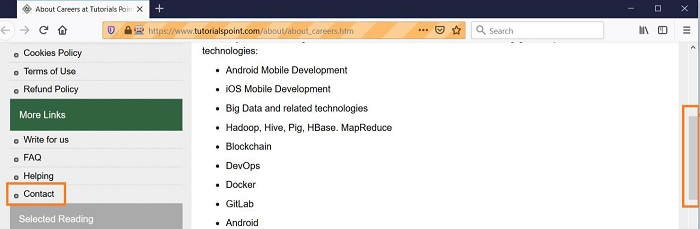
输出

更新于: 2021-11-18
687 次浏览

广告