
 数据结构
数据结构 网络
网络 RDBMS
RDBMS 操作系统
操作系统 Java
Java MS Excel
 iOS
iOS HTML
HTML CSS
CSS Android
 Python
 C 编程
C 编程 C++
C++ C#
C# MongoDB
 MySQL
MySQL Javascript
 PHP
PHP 物理
物理 化学
化学 生物
生物 数学
数学 英语
英语 经济
经济 心理学
心理学 社会学
社会学 时尚研究
时尚研究 法律研究
法律研究如何在 Java 中为 JButton 设置动作命令
通过设置动作命令,这里我们在单击某个按钮时在控制台上显示一条消息。
首先设置按钮
JButton btn = new JButton("Demo Button");现在,将 Action Listener 设置为在单击按钮时触发
ActionListener actionListener = new ActionListener() {
   public void actionPerformed(ActionEvent event) {
      String str = event.getActionCommand();
      System.out.println("Clicked = " + str);
   }
};
以下是为 JButton 设置动作命令的一个示例
示例
import java.awt.event.ActionEvent;
import java.awt.event.ActionListener;
import javax.swing.JButton;
import javax.swing.JOptionPane;
public class SwingDemo {
   public static void main(final String args[]) {
      JButton btn = new JButton("Demo Button");
      ActionListener actionListener = new ActionListener() {
         public void actionPerformed(ActionEvent event) {
            String str = event.getActionCommand();
            System.out.println("Clicked = " + str);
         }
      };
      btn.setActionCommand("FirstButton");
      btn.addActionListener(actionListener);
      JOptionPane.showMessageDialog(null, btn);
   }
}
输出
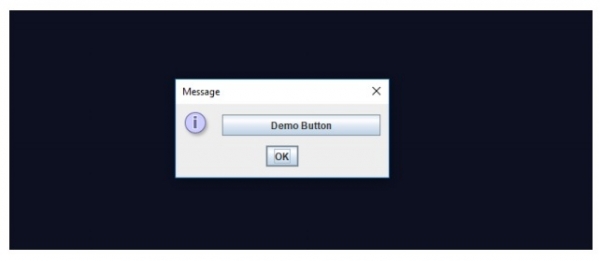
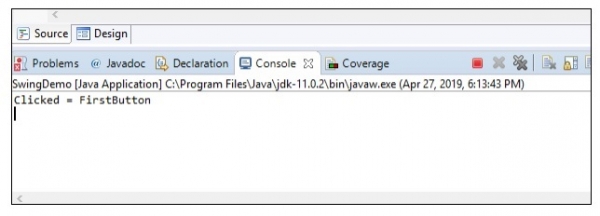
当单击上面的“Demo Button”时,以下文本将在 EclipseIDE 输出窗口中显示

更新于:30-Jul-2019
3000+ 次查看

广告