
 数据结构
数据结构 网络
网络 RDBMS
RDBMS 操作系统
操作系统 Java
Java MS Excel
 iOS
iOS HTML
HTML CSS
CSS Android
 Python
 C 编程
C 编程 C++
C++ C#
C# MongoDB
 MySQL
MySQL Javascript
 PHP
PHP 物理
物理 化学
化学 生物
生物 数学
数学 英语
英语 经济学
经济学 心理学
心理学 社会学
社会学 时装研究
时装研究 法律研究
法律研究如何在 Java 中为 JScrollPane 设置行标题视图?
使用 setRowHeaderView() 方法设置行标题视图。让我们首先创建一个 KScrollPane 并设置一个列表 -
List<String> myList = new ArrayList<>(10);
for (int index = 0; index < 20; index++) {
   myList.add("List Item " + index);
}
final JList<String> list = new JList<String>(myList.toArray(new String[myList.size()]));
JScrollPane scrollPane = new JScrollPane();
scrollPane.setViewportView(list);
现在,设置行标题视图 -
scrollPane.setRowHeaderView(new JLabel("All List Items "));以下示例在 Java 中为 JScrollPane 设置了行标题视图 -
示例
package my;
import java.awt.BorderLayout;
import java.util.ArrayList;
import java.util.List;
import javax.swing.JFrame;
import javax.swing.JLabel;
import javax.swing.JList;
import javax.swing.JPanel;
import javax.swing.JScrollPane;
public class SwingDemo {
   public static void main(String[] args) {
      JPanel panel = new JPanel(new BorderLayout());
      List<String> myList = new ArrayListlt;>(10);
      for (int index = 0; index lt; 20; index++) {
         myList.add("List Item " + index);
      }
      final JListlt;String> list = new JListlt;String>(myList.toArray(new String[myList.size()]));
      JScrollPane scrollPane = new JScrollPane();
      scrollPane.setViewportView(list);
      scrollPane.setRowHeaderView(new JLabel("All List Items "));
      list.setLayoutOrientation(JList.VERTICAL);
      panel.add(scrollPane);
      JFrame frame = new JFrame("Demo");
      frame.setDefaultCloseOperation(JFrame.EXIT_ON_CLOSE);
      frame.add(panel);
      frame.setSize(500, 250);
      frame.setLocationRelativeTo(null);
      frame.setVisible(true);
   }
}
输出
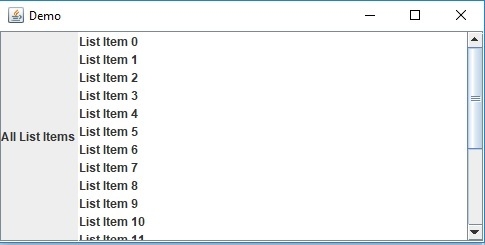

更新于: 30-7-2019
542 次浏览

广告