
 数据结构
数据结构 网络
网络 RDBMS
RDBMS 操作系统
操作系统 Java
Java MS Excel
 iOS
iOS HTML
HTML CSS
CSS Android
 Python
 C 编程
C 编程 C++
C++ C#
C# MongoDB
 MySQL
MySQL Javascript
 PHP
PHP 物理
物理 化学
化学 生物
生物 数学
数学 英语
英语 经济学
经济学 心理学
心理学 社会研究
社会研究 时尚研究
时尚研究 法律研究
法律研究如何在 Python 中使用 Selenium 中的 Chrome Web 驱动程序下载文件?
我们可以使用 Selenium 中的 Chrome Web 驱动程序在 Python 中下载文件。我们将为此目的使用 ChromeOptions 类。首先,我们将创建 ChromeOptions 类的对象。
然后对创建的对象应用 add_experimental_option 方法。我们将设置 download.default_directory:<location of downloaded file> 参数。最后,此信息将传递给驱动程序对象。
语法
op = webdriver.ChromeOptions()
p = {'download.default_directory':'C:\Users\ghs6kor\Downloads\Test'}
op.add_experimental_option('prefs', p)
范例
from selenium import webdriver
from selenium.webdriver.chrome.options import Options
#object of Options class
op = webdriver.ChromeOptions()
#browser preferences
p = {'download.default_directory':'C:\Users\ghs6kor\Downloads\Test'}
#add options to browser
op.add_experimental_option('prefs', p)
#set chromedriver.exe path
driver = webdriver.Chrome(executable_path="C:\chromedriver.exe",
options=op)
#maximize browser
driver.maximize_window()
#launch URL
driver.get("https://www.seleniumhq.org/download/");
#click download link
l = driver.find_element_by_link_text("32 bit Windows IE")
l.click()
输出
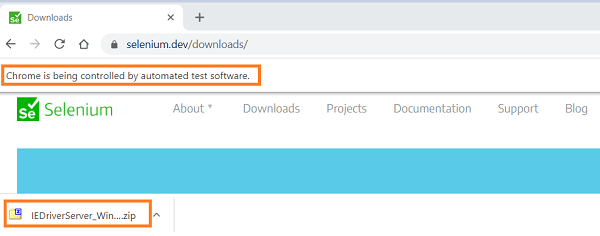
此外,文件将下载到所需位置。


更新于:01-Feb-2021
1K+ 浏览次数

广告