
 数据结构
数据结构 网络
网络 RDBMS
RDBMS 操作系统
操作系统 Java
Java MS Excel
 iOS
iOS HTML
HTML CSS
CSS Android
 Python
 C 编程
C 编程 C++
C++ C#
C# MongoDB
 MySQL
MySQL Javascript
 PHP
PHP 物理学
物理学 化学
化学 生物学
生物学 数学
数学 英语
英语 经济学
经济学 心理学
心理学 社会学
社会学 时尚研究
时尚研究 法律研究
法律研究如何将图像用于 HTML5 canvas?
HTML5 <canvas> 标签用于利用脚本绘制图形、动画等。它是 HTML5 中引入的新标签。要将图像用于 HTML5 画布,请使用 drawImage() 方法。此方法会将给定图像绘制到画布上。
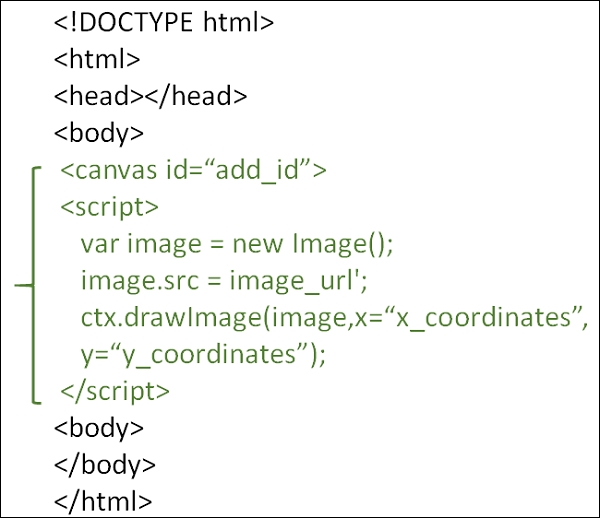
可以尝试运行以下代码来学习如何将图像用于 HTML 画布。此处,image 是对图像或画布对象的一个引用。x 和 y 构成目标画布上的坐标,我们的图像应置于此处。
示例
<!DOCTYPE HTML>
<html>
   <head>
      <script type="text/javascript">
         function drawShape() {
            // get the canvas element using the DOM
            var canvas = document.getElementById('mycanvas');

            // Make sure we don't execute when canvas isn't supported
            if (canvas.getContext) {

               // use getContext to use the canvas for drawing
               var ctx = canvas.getContext('2d');

               // Draw shapes
               var img = new Image();
               img.src = '/images/backdrop.jpg';
               img.onload = function() {
                  ctx.drawImage(img,0,0);
                  ctx.beginPath();
                  ctx.moveTo(30,96);
                  ctx.lineTo(70,66);
                  ctx.lineTo(103,76);
                  ctx.lineTo(170,15);
                  ctx.stroke();
               }
            } else {
               alert('You need Safari or Firefox 1.5+ to see this demo.');
            }
         }
      </script>
   </head>

   <body onload="drawShape();">
      <canvas id="mycanvas"></canvas>
   </body>
</html>

更新于:25-2 月-2020
367 次浏览

广告